Studio and Graph › Animation
Retarget Animation
Moves a whole animation take onto a different rig's bones, chain by chain - one retarget per frame of the source take.
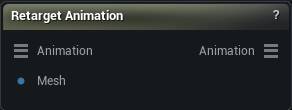
The Retarget Animation node
When to use it
Moves a whole animation take onto a different rig's bones, chain by chain - one retarget per frame of the source take.
Pins
| Pin | Type | Description |
|---|---|---|
Animation |
Animation | The animation to retarget, from a Load Animation node. Its own skeleton is the source rig. |
Mesh |
Mesh | The rigged mesh whose skeleton the animation is moved onto. It is read at its rest pose - that is the bind reference every frame is measured against. |
| Pin | Type | Description |
|---|---|---|
Animation |
Animation | The same take on the target rig's bones. |
Settings
| Setting | Type | Description |
|---|---|---|
Rotation Mode |
Choice | How a target chain takes its rotation from the source chain when the two have different bone counts. Interpolated copes with most rigs. |
Apply Root Rotation |
True/False | Carry the source's body facing and torso lean across. Turn it off to keep the target pointing the way it was authored. |
Apply Root Translation |
True/False | Move the target's pelvis by the source's root motion, scaled to the target's height. |
Enable IK |
True/False | A second pass over the arm and leg chains that pins hands and feet onto a goal worked out from the source. The plain bone transfer already gives you a correct pose; this tightens up where the hands and feet land when the two characters are built very differently. It only fires on chains the source marks as limbs, which today means a SAM 3D Body source. On anything else it changes nothing either way. |
IK Alpha |
Number | 0 leaves the pose where the bone transfer put it, 1 puts the hand or foot right on the goal. |
Allow Stretch |
True/False | Let a limb stretch past its rest length to reach a goal it cannot otherwise get to, instead of stopping at full extension. Watch for rubbery forearms. |
Retarget IK Bones |
True/False | Keep the rig's marker bones (ik_foot_l, ik_hand_r, ik_hand_gun and the rest) following their real bones after the transfer, so foot planting and weapon setups still work on the new pose. Leave it on for UE5 Mannequin and MetaHuman skeletons. |
Learn more
| Delta Mush in Mesh Morpher Graph | Read the walkthrough on meshmorpher.com | https://meshmorpher.com/blog/delta-mush-in-mesh-morpher-graph |
| ML Deformer and MetaHuman facial expressions | Read the walkthrough on meshmorpher.com | https://meshmorpher.com/blog/ml-deformer-and-meta-human-facial-expressions |
Available in Mesh Morpher Graph and Mesh Morpher Studio.