Studio and Graph › Animation
Apply Animation Frame
Samples an animation at one moment, in seconds, and hands you the mesh deformed into that pose. From there it is an ordinary mesh: measure it, sculpt on it, bake it, compare it against another pose.
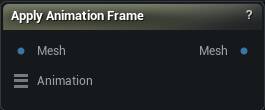
The Apply Animation Frame node
When to use it
Samples an animation at one moment, in seconds, and hands you the mesh deformed into that pose. From there it is an ordinary mesh: measure it, sculpt on it, bake it, compare it against another pose.
Pins
| Pin | Type | Description |
|---|---|---|
Mesh |
Mesh | The mesh to pose. It needs bones and skin weights on it already - a skeletal import, an auto-rig, or Transfer Weights. |
Animation |
Animation | The animation to sample. Its bone names have to match the mesh's, or nothing moves. |
| Pin | Type | Description |
|---|---|---|
Mesh |
Mesh | The mesh, posed at Time. |
Settings
| Setting | Type | Description |
|---|---|---|
Time |
Number | Where in the animation to sample, in seconds. Past the end it holds on the last frame, unless Looping is on. |
Looping |
True/False | Wrap Time back round to the start once it runs past the end, instead of sticking on the last frame. |
Use Dual Quaternion Skinning |
True/False | Dual quaternion skinning instead of linear blend. Keeps volume on a twisted forearm or wrist, where linear blend pinches the mesh into a candy wrapper. |
Recompute Normals |
True/False | Rebuild the normals after posing. Turn it off and the shading stays keyed to the rest pose, so the lighting slides around over the deformed surface. |
Learn more
| Delta Mush in Mesh Morpher Graph | Read the walkthrough on meshmorpher.com | https://meshmorpher.com/blog/delta-mush-in-mesh-morpher-graph |
| ML Deformer and MetaHuman facial expressions | Read the walkthrough on meshmorpher.com | https://meshmorpher.com/blog/ml-deformer-and-meta-human-facial-expressions |
Available in Mesh Morpher Graph and Mesh Morpher Studio.