Classic › Editor › Tools
Smooth Tool
Smooth Tool allows users to Smooth vertices using the sculpt brush.

There are two types of Smoothing. by Preserving UV flow or if disabled then the smoothing is uniform.
Smooth can also be applied to the entire mesh or a mask selection by click on Apply Smoothing.
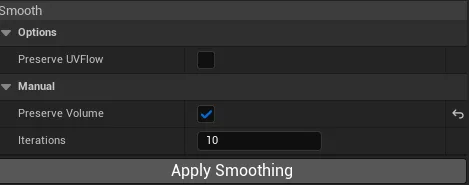
| Options | Description |
|---|---|
| Preserve Volume | Reprojects the smoothed vertices maintaining volume. |
| Iterations | Iterations count performed by Apply Smoothing(not by brush sculpting) |
Users can press Ctrl + Z to Undo and Ctrl + Y to Redo the operation.