Studio and Graph › Weight Map
Paint Weight Map
The hand-painted weight map. Select the node, brush the region you want onto the mesh in the viewport, and press Accept to publish it on the WeightMap pin.
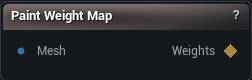
The Paint Weight Map node
When to use it
The hand-painted weight map. Select the node, brush the region you want onto the mesh in the viewport, and press Accept to publish it on the WeightMap pin.
Reach for it when the region you need is a judgement call rather than something the mesh can be asked about. Create Weight Map covers everything derivable - curvature, landmark proximity, a bone's skin weights - and it re-derives itself when the mesh changes, which strokes cannot. Paint the ones only you can decide: which corner of a cloth is pinned, where a muscle attaches.
Brush size, strength and falloff come from the viewport Brush controls, the same ones mesh sculpting uses. Nothing leaves the node until you press Accept.
How to use it
- 1
Connect the mesh you want to paint on
- 2
Select the node to pick up the brush
- 3
Paint the region in the viewport
- 4
Press Accept to publish the map
Pins
| Pin | Type | Description |
|---|---|---|
Mesh |
Mesh | The mesh the weight map is painted on. One value per vertex. |
| Pin | Type | Description |
|---|---|---|
WeightMap |
Weight Map | The painted 0-1 weight map. Wire it into a Cloth Object's Pin Map, a Flesh Attachment, or a Muscle's origin and insertion. |
Available in Mesh Morpher Graph and Mesh Morpher Studio.