Studio and Graph › Voxel
Paint
Painting values into the voxel field.
Mesh Morpher documentation
Studio and Graph › Voxel
Painting values into the voxel field.
Studio and Graph › Voxel › Paint
Paints vertex colours straight onto the voxel surface. Paint, Texture, Smooth and Erase brushes. Density goes in one side and out the other untouched; only the colour channels change.
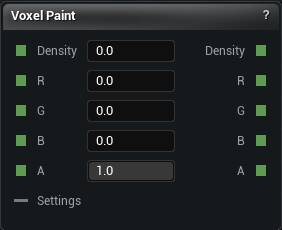
The Paint node
Paints vertex colours straight onto the voxel surface. Paint, Texture, Smooth and Erase brushes. Density goes in one side and out the other untouched; only the colour channels change.
Hand painting is for variation you cannot describe as a rule. Anything rule-based belongs in Height Gradient, Hue Shift or Color Blend, because those follow the shape when it changes and strokes do not.
It needs the same Generate Settings node as everything else. Feed the upstream density and colour into Density and R/G/B/A. Strokes save with the graph.
| Pin | Type | Description |
|---|---|---|
Density |
Number | The shape. This node never touches it. |
R |
Number | Red coming in. Leave it empty and the surface starts white. |
G |
Number | Green coming in. Leave it empty and the surface starts white. |
B |
Number | Blue coming in. Leave it empty and the surface starts white. |
A |
Number | Alpha coming in. Leave it empty and everything is opaque. |
Settings |
Voxel Settings | Wants a Generate Settings node: blocky or smooth, how fine the voxels are, how far to look for the surface. Share one settings node with Density to Mesh and what you paint on is exactly what you bake. |
| Pin | Type | Description |
|---|---|---|
Density |
Number | The shape, exactly as it came in. |
R |
Number | Red with your paint in it. |
G |
Number | Green with your paint in it. |
B |
Number | Blue with your paint in it. |
A |
Number | Alpha with your paint in it. The alpha of the brush colour lands here. |
| Setting | Type | Description |
|---|---|---|
Composition Mode |
Choice | How your paint meets the colour underneath. Replace swaps it out where you touched, Add tints on top, Multiply darkens. |
Current Brush |
Text | Which brush a click or a drag uses. |
Brush Rate |
Number | How many times a second the brush fires while you hold the button down. A single click always lands once. Size, strength and falloff come from the viewport Brush controls, same as mesh sculpting. |
Brush Color |
Colour | The colour the Paint brush lays down. |
Brush Texture Node Id |
Node picker | The image the Texture brush stamps. The list holds every Load Texture File node in this graph, so drop one in first and it shows up here. |
Texture World Size |
Number | How big the image is on the surface, in world units. Bigger stretches it further, so the pattern repeats less often. |
Texture Rotation |
Number | Spin the image on the surface, in degrees. |
Available in Mesh Morpher Graph and Mesh Morpher Studio.