Studio and Graph › Voxel › Noise
Noise 3D
3D noise whose basis is picked at runtime through the Noise Type pin. Wire a Noise Type selector, or any int source, and swap between Perlin, Simplex and Value without rewiring anything.
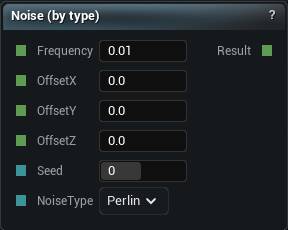
The Noise 3D node
When to use it
3D noise whose basis is picked at runtime through the Noise Type pin. Wire a Noise Type selector, or any int source, and swap between Perlin, Simplex and Value without rewiring anything.
Those three are the whole list. White Noise and Cellular Noise are separate nodes and this pin cannot reach them.
Worth it when the basis is genuinely data-driven or you are comparing two of them side by side. When it is not, the fixed nodes say on the canvas which noise you are getting, and six months later that matters.
Pins
| Pin | Type | Description |
|---|---|---|
Frequency |
Number | How tight the pattern is. Higher numbers give you finer, busier detail. |
OffsetX |
Number | Slide the pattern along X. |
OffsetY |
Number | Slide the pattern along Y. |
OffsetZ |
Number | Slide the pattern along Z. |
Seed |
Whole Number | Change this for a different pattern at the same settings. The same seed always gives you the same noise. |
NoiseType |
Choice | Which flavour of noise to use. Wire a Noise Type node in to swap it from the graph. |
| Pin | Type | Description |
|---|---|---|
Result |
Number | The noise here. Roughly -1 to 1. |
Available in Mesh Morpher Graph and Mesh Morpher Studio.