Studio and Graph › Voxel › Modification
Erosion
Slope-weighted fractal noise laid over a shape you already have. Rough highlights along cliffs and ridges, flat ground left mostly alone.
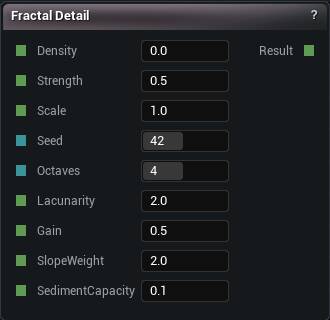
The Erosion node
When to use it
Slope-weighted fractal noise laid over a shape you already have. Rough highlights along cliffs and ridges, flat ground left mostly alone.
No water is involved and no valleys get carved. Hydraulic Erosion is the one that does that, at the cost of a full simulation on every compile. This is cheap enough to leave switched on while you work.
Save it for last. It roughens large forms. It cannot create them.
Pins
| Pin | Type | Description |
|---|---|---|
Density |
Number | The shape you want roughed up. |
Strength |
Number | How much of the detail to add. Push it far and the surface breaks into noise instead of looking weathered. |
Scale |
Number | How big the bumps are. |
Seed |
Whole Number | Changes the pattern without changing anything else. |
Octaves |
Whole Number | How many layers of detail to pile on. Each one is finer than the last and costs a little more. |
Lacunarity |
Number | How much finer each layer gets. |
Gain |
Number | How much quieter each layer gets. |
SlopeWeight |
Number | How much the steep parts get over the flats. At 0 the detail lands evenly everywhere. |
SedimentCapacity |
Number | How much settles into the flat bits. |
| Pin | Type | Description |
|---|---|---|
Result |
Number | The same shape, roughed up. |
Available in Mesh Morpher Graph and Mesh Morpher Studio.