Studio and Graph › Voxel › Input
Surface Attributes
These outputs read zero. All six of them, everywhere in the app.
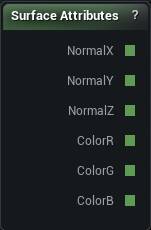
The Surface Attributes node
When to use it
These outputs read zero. All six of them, everywhere in the app.
The node was built for a mesh spawner that could ask "does this surface face up" before scattering grass. That spawner was removed, and nothing fills in surface normals or painted colour any more. Drop one into a density graph and the compiler posts a warning saying exactly that.
If you came here to vary something by height, Position Z into a Select does the job, and Height Gradient does it for colour.
Pins
| Pin | Type | Description |
|---|---|---|
NormalX |
Number | How far the surface leans along X. |
NormalY |
Number | How far the surface leans along Y. |
NormalZ |
Number | How much the surface faces up. Near 1 is flat ground, near 0 is a cliff face. This is the one you want for slope tests. |
ColorR |
Number | Red in the paint at this spot, 0 to 1. |
ColorG |
Number | Green in the paint at this spot, 0 to 1. |
ColorB |
Number | Blue in the paint at this spot, 0 to 1. |
Available in Mesh Morpher Graph and Mesh Morpher Studio.