Studio and Graph › Voxel
Generate
Generating geometry out of the field.
Mesh Morpher documentation
Studio and Graph › Voxel
Generating geometry out of the field.
Studio and Graph › Voxel › Generate
Where a voxel graph stops being maths and becomes a mesh. Wire your field into Density, hang a Generate Settings node off Settings, press Generate Mesh. R/G/B/A and U/V are optional; wire them and ...
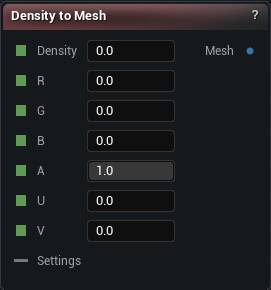
The Density To Mesh node
Where a voxel graph stops being maths and becomes a mesh. Wire your field into Density, hang a Generate Settings node off Settings, press Generate Mesh. R/G/B/A and U/V are optional; wire them and the result carries vertex colours and UVs.
| Pin | Type | Description |
|---|---|---|
Density |
Number | The shape, as a field. Negative means inside, positive means outside, and the skin sits where it crosses zero. |
R |
Number | Red for the vertex colour, 0 to 1. Optional. |
G |
Number | Green for the vertex colour, 0 to 1. Optional. |
B |
Number | Blue for the vertex colour, 0 to 1. Optional. |
A |
Number | Alpha for the vertex colour, 0 to 1. Leave it alone and everything is opaque. |
U |
Number | U for the UVs. Optional. |
V |
Number | V for the UVs. Optional. |
Settings |
Voxel Settings | Wants a Generate Settings node. It decides blocky or smooth, how fine the voxels are and how much of the field gets built. Share one settings node with Voxel Sculpt and what you sculpted is what you bake. Collision and raytracing settings do nothing here. |
| Pin | Type | Description |
|---|---|---|
Mesh |
Mesh | The finished mesh, carrying colour and UVs if you wired those inputs. Goes into any mesh node from here. |
| Setting | Type | Description |
|---|---|---|
Material Section Name |
Text | What the mesh's one material slot gets called. Worth setting, or it shows up as "Section 0" everywhere you look at it later. Renaming it does not rebuild anything. |
Available in Mesh Morpher Graph and Mesh Morpher Studio.
Studio and Graph › Voxel › Generate
One node, wired into every voxel consumer in the graph. It carries the mesher choice, the voxel size, the ISO level and the volume that gets scanned.

The Generate Settings node
One node, wired into every voxel consumer in the graph. It carries the mesher choice, the voxel size, the ISO level and the volume that gets scanned.
| Pin | Type | Description |
|---|---|---|
Settings |
Voxel Settings | The settings, ready to plug into a Generate, Sculpt or Paint node. |
| Setting | Type | Description |
|---|---|---|
Mesher Type |
Choice | Blocky or smooth. Everything under Cubic applies to the first and everything under Dual Marching Cubes to the second; the details panel hides whichever one you are not using. |
| Setting | Type | Description |
|---|---|---|
Cubic: Grid Size |
Whole number (X, Y, Z) | How many voxels make up one chunk, per axis. Bigger chunks mean fewer of them and more work in each. |
Cubic: Voxel Size |
Number | How much world space one voxel covers, in centimetres. Halve it for twice the detail and roughly eight times the work. |
Cubic: ISO Level |
Number | The density value the mesher treats as the surface. Everything in this toolset - the primitives, the CSG nodes, the sculpt brushes - is written for 0, so leave it there unless the field is coming from somewhere else. |
Cubic: Inverted |
True/False | Swaps inside for outside: solid where the density is above the iso level instead of below it. The sculpt brushes follow it, so Add still adds. |
Greedy Meshing |
True/False | Merges neighbouring coplanar faces into single large quads instead of emitting one per voxel face. Far fewer triangles for the same blocky shape, and on by default. |
Per Chunk Parallelization |
True/False | Splits the meshing work inside a single chunk across threads. Off by default. |
| Setting | Type | Description |
|---|---|---|
Dual Marching Cubes: Grid Size |
Whole number (X, Y, Z) | How many voxels make up one chunk, per axis. Bigger chunks mean fewer of them and more work in each. |
Dual Marching Cubes: Voxel Size |
Number | How much world space one voxel covers, in centimetres. Halve it for twice the detail and roughly eight times the work. |
Dual Marching Cubes: ISO Level |
Number | The density value the mesher treats as the surface. Everything in this toolset - the primitives, the CSG nodes, the sculpt brushes - is written for 0, so leave it there unless the field is coming from somewhere else. |
Dual Marching Cubes: Inverted |
True/False | Swaps inside for outside: solid where the density is above the iso level instead of below it. The sculpt brushes follow it, so Add still adds. |
Force Manifold |
True/False | Runs the extra pass that resolves the cell configurations which would otherwise leave an edge shared by more than two faces. On by default, because most of what you would do next with the mesh refuses a non-manifold one. |
| Setting | Type | Description |
|---|---|---|
Auto Fit Bounds |
True/False | Find the shape on its own and build only where it actually is. On by default, and it saves you sizing a box by hand. It works by sniffing for the surface, which needs the field to behave like a distance. Multiply a density by 50 somewhere upstream and the sniffing goes wrong: patches of surface never get built and you get a mesh full of holes. Turn this off and give it a box when that happens, or when you only want a piece of a bigger field. |
Search Extent |
Number | How far out from the origin to look for the surface. Be generous. Empty space costs nothing here, and if your shape runs past this line it gets cut off flat at the edge. The node warns you when it hits the boundary. |
Bounds Center |
Vector | Where the box sits, when you are placing it yourself. |
Bounds Extent |
Vector | How big the box is from the middle out, when you are placing it yourself. What gets built is filled in whole tiles, so it can spill a little past the size you type. |
| Setting | Type | Description |
|---|---|---|
Enable Raytracing |
True/False | Builds raytracing data for the live preview. It has no bearing on the mesh Density to Mesh hands you. |
| Setting | Type | Description |
|---|---|---|
Enable Collision |
True/False | Builds collision for the live preview. Same as raytracing: the baked mesh does not carry it. |
Collision Max LOD |
Whole number | How far down the LOD chain to build collision. 0 is full detail only, which is nearly always what you want. |
Async Collision |
True/False | Cooks that collision on a worker thread so the preview does not stall while it finishes. |
Available in Mesh Morpher Graph and Mesh Morpher Studio.