Studio and Graph › Voxel
Color
Colour fields and colour maths carried alongside the distance field.
Mesh Morpher documentation
Studio and Graph › Voxel
Colour fields and colour maths carried alongside the distance field.
Studio and Graph › Voxel › Color
Blends two colours by an Alpha. All four channels, so it is four Lerps in one node and they cannot drift out of step.
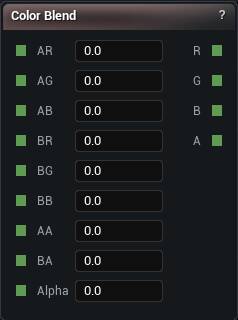
The Color Blend node
Blends two colours by an Alpha. All four channels, so it is four Lerps in one node and they cannot drift out of step.
Alpha here is the blend factor, not the alpha channel. The alpha channels have their own AA and BA pins and get blended along with the rest.
Good when the control is already a 0 to 1 mask. Height Gradient is the version that maps a raw range for you.
| Pin | Type | Description |
|---|---|---|
AR |
Number | Red of colour A, what you get at Alpha 0. |
AG |
Number | Green of colour A. |
AB |
Number | Blue of colour A. |
BR |
Number | Red of colour B, what you get at Alpha 1. |
BG |
Number | Green of colour B. |
BB |
Number | Blue of colour B. |
AA |
Number | Alpha of colour A. |
BA |
Number | Alpha of colour B. |
Alpha |
Number | How far to mix, 0 for A and 1 for B. Nothing to do with the alpha channel, despite the name. |
| Pin | Type | Description |
|---|---|---|
R |
Number | Red of the mix. |
G |
Number | Green of the mix. |
B |
Number | Blue of the mix. |
A |
Number | Alpha of the mix. |
Available in Mesh Morpher Graph and Mesh Morpher Studio.
Studio and Graph › Voxel › Color
One fixed colour, for the R/G/B/A inputs on Density to Mesh or a Paint node. The quickest way to give voxel output a solid colour without touching a material.
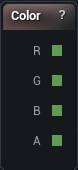
The Constant Color node
One fixed colour, for the R/G/B/A inputs on Density to Mesh or a Paint node. The quickest way to give voxel output a solid colour without touching a material.
When the colour should follow the shape, Height Gradient and Color Blend are the nodes that do that.
| Pin | Type | Description |
|---|---|---|
R |
Number | Red. |
G |
Number | Green. |
B |
Number | Blue. |
A |
Number | Alpha. |
| Setting | Type | Description |
|---|---|---|
Color |
Colour | The colour. |
Available in Mesh Morpher Graph and Mesh Morpher Studio.
Studio and Graph › Voxel › Color
Converts HSV back to RGB. Hue is in degrees from 0 to 360, saturation and value from 0 to 1.
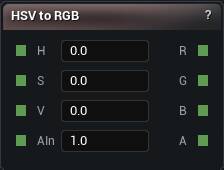
The HSV to RGB node
Converts HSV back to RGB. Hue is in degrees from 0 to 360, saturation and value from 0 to 1.
The degrees are the trap. Feed a 0 to 1 hue in here, as though it were normalised, and you get one thin sliver of red instead of the spectrum you expected. Multiply by 360 first.
Values outside the range wrap, so a hue of 400 is a hue of 40.
| Pin | Type | Description |
|---|---|---|
H |
Number | Hue, in degrees round the wheel. Go past 360 or below 0 and it wraps by itself. |
S |
Number | How strong the colour is, 0 to 1. Anything outside gets pulled back in. |
V |
Number | How bright it is, 0 to 1. Anything outside gets pulled back in. |
AIn |
Number | Alpha, 0 to 1. It comes out the far side untouched. |
| Pin | Type | Description |
|---|---|---|
R |
Number | Red, 0 to 1. |
G |
Number | Green, 0 to 1. |
B |
Number | Blue, 0 to 1. |
A |
Number | Alpha, exactly as it came in. |
Available in Mesh Morpher Graph and Mesh Morpher Studio.
Studio and Graph › Voxel › Color
Blends two colours by world height. Grass below, snow above, with no materials involved.
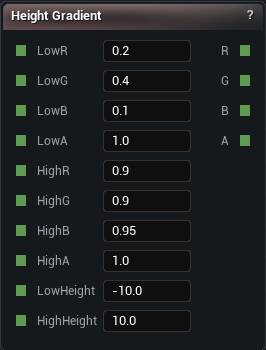
The Height Gradient Color node
Blends two colours by world height. Grass below, snow above, with no materials involved.
| Pin | Type | Description |
|---|---|---|
LowR |
Number | Red at the bottom of the range. |
LowG |
Number | Green at the bottom of the range. |
LowB |
Number | Blue at the bottom of the range. |
LowA |
Number | Alpha at the bottom of the range. |
HighR |
Number | Red at the top of the range. |
HighG |
Number | Green at the top of the range. |
HighB |
Number | Blue at the top of the range. |
HighA |
Number | Alpha at the top of the range. |
LowHeight |
Number | At or below this, you get the low colour with nothing mixed in. |
HighHeight |
Number | At or above this, you get the high colour with nothing mixed in. |
| Pin | Type | Description |
|---|---|---|
R |
Number | Red, mixed for this height. |
G |
Number | Green, mixed for this height. |
B |
Number | Blue, mixed for this height. |
A |
Number | Alpha, mixed for this height. |
Available in Mesh Morpher Graph and Mesh Morpher Studio.
Studio and Graph › Voxel › Color
Rotates the hue of an RGB colour and leaves saturation and value alone. Per-region biome variation from one base colour, without the round trip through HSV and back.
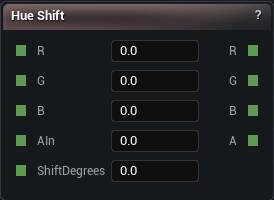
The Hue Shift node
Rotates the hue of an RGB colour and leaves saturation and value alone. Per-region biome variation from one base colour, without the round trip through HSV and back.
Shift Degrees wraps at 360, so 370 and 10 give you the same colour.
When you need to change more than hue, the explicit RGB to HSV and HSV to RGB pair is the way.
| Pin | Type | Description |
|---|---|---|
R |
Number | Red of the colour going in. |
G |
Number | Green of the colour going in. |
B |
Number | Blue of the colour going in. |
AIn |
Number | Alpha. It comes out the far side untouched. |
ShiftDegrees |
Number | How far round the colour wheel to spin, in degrees. It wraps, so 400 is the same as 40. |
| Pin | Type | Description |
|---|---|---|
R |
Number | Red after the spin. |
G |
Number | Green after the spin. |
B |
Number | Blue after the spin. |
A |
Number | Alpha, exactly as it came in. |
Available in Mesh Morpher Graph and Mesh Morpher Studio.
Studio and Graph › Voxel › Color
Converts RGB to HSV so hue, saturation and value can be moved independently.
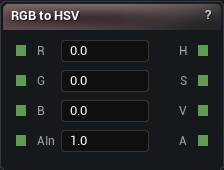
The RGB to HSV node
Converts RGB to HSV so hue, saturation and value can be moved independently.
That is the only sane way to build colour variation. Nudge R, G and B separately and you change brightness and hue together, and you end up chasing your own tail.
Pair it with HSV to RGB to convert back. Hue Shift is the shortcut when rotating hue is all you need. Alpha passes through untouched.
| Pin | Type | Description |
|---|---|---|
R |
Number | Red, 0 to 1. |
G |
Number | Green, 0 to 1. |
B |
Number | Blue, 0 to 1. |
AIn |
Number | Alpha, 0 to 1. It comes out the far side untouched. |
| Pin | Type | Description |
|---|---|---|
H |
Number | Hue, in degrees round the wheel. |
S |
Number | How strong the colour is, 0 to 1. |
V |
Number | How bright it is, 0 to 1. |
A |
Number | Alpha, exactly as it came in. |
Available in Mesh Morpher Graph and Mesh Morpher Studio.
Studio and Graph › Voxel › Color
Samples a 2D texture at the current world XY position with bilinear filtering. Hand-painted biome masks, splat maps, height ramps, anything easier to draw than to describe.
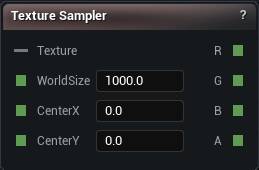
The Texture Sampler node
Samples a 2D texture at the current world XY position with bilinear filtering. Hand-painted biome masks, splat maps, height ramps, anything easier to draw than to describe.
| Pin | Type | Description |
|---|---|---|
Texture |
Texture | The picture to read. It has to come from a Load Texture File node. |
WorldSize |
Number | How much ground the picture is stretched across, in world units. |
CenterX |
Number | Where the middle of the picture sits along X. |
CenterY |
Number | Where the middle of the picture sits along Y. |
| Pin | Type | Description |
|---|---|---|
R |
Number | Red of the pixel under this voxel. |
G |
Number | Green of the pixel under this voxel. |
B |
Number | Blue of the pixel under this voxel. |
A |
Number | Alpha of the pixel under this voxel. |
| Setting | Type | Description |
|---|---|---|
Wrap |
True/False | What happens past the edge of the picture. On, it tiles forever. Off, the edge pixels smear outwards in long streaks. |
Available in Mesh Morpher Graph and Mesh Morpher Studio.