Studio and Graph › Voxel › Color
RGB to HSV
Converts RGB to HSV so hue, saturation and value can be moved independently.
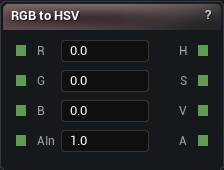
The RGB to HSV node
When to use it
Converts RGB to HSV so hue, saturation and value can be moved independently.
That is the only sane way to build colour variation. Nudge R, G and B separately and you change brightness and hue together, and you end up chasing your own tail.
Pair it with HSV to RGB to convert back. Hue Shift is the shortcut when rotating hue is all you need. Alpha passes through untouched.
Pins
| Pin | Type | Description |
|---|---|---|
R |
Number | Red, 0 to 1. |
G |
Number | Green, 0 to 1. |
B |
Number | Blue, 0 to 1. |
AIn |
Number | Alpha, 0 to 1. It comes out the far side untouched. |
| Pin | Type | Description |
|---|---|---|
H |
Number | Hue, in degrees round the wheel. |
S |
Number | How strong the colour is, 0 to 1. |
V |
Number | How bright it is, 0 to 1. |
A |
Number | Alpha, exactly as it came in. |
Available in Mesh Morpher Graph and Mesh Morpher Studio.