Studio and Graph › Voxel › Color
Color Blend
Blends two colours by an Alpha. All four channels, so it is four Lerps in one node and they cannot drift out of step.
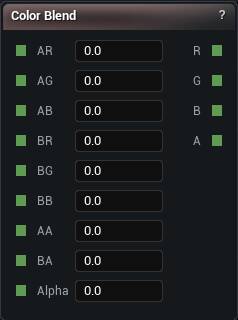
The Color Blend node
When to use it
Blends two colours by an Alpha. All four channels, so it is four Lerps in one node and they cannot drift out of step.
Alpha here is the blend factor, not the alpha channel. The alpha channels have their own AA and BA pins and get blended along with the rest.
Good when the control is already a 0 to 1 mask. Height Gradient is the version that maps a raw range for you.
Pins
| Pin | Type | Description |
|---|---|---|
AR |
Number | Red of colour A, what you get at Alpha 0. |
AG |
Number | Green of colour A. |
AB |
Number | Blue of colour A. |
BR |
Number | Red of colour B, what you get at Alpha 1. |
BG |
Number | Green of colour B. |
BB |
Number | Blue of colour B. |
AA |
Number | Alpha of colour A. |
BA |
Number | Alpha of colour B. |
Alpha |
Number | How far to mix, 0 for A and 1 for B. Nothing to do with the alpha channel, despite the name. |
| Pin | Type | Description |
|---|---|---|
R |
Number | Red of the mix. |
G |
Number | Green of the mix. |
B |
Number | Blue of the mix. |
A |
Number | Alpha of the mix. |
Available in Mesh Morpher Graph and Mesh Morpher Studio.