Studio and Graph › UV
Transform UVs
Rotates, scales, offsets and flips the UVs of one channel, either across the whole mesh or on the islands a selection touches.
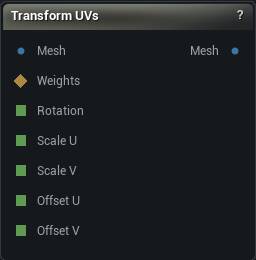
The Transform UVs node
When to use it
Rotates, scales, offsets and flips the UVs of one channel, either across the whole mesh or on the islands a selection touches.
The small manual correction that every unwrap eventually needs, and the only one of these operations that has no equivalent anywhere else in the graph: turning a strip upright so its texel grid lines up with the texture, nudging an island off a tile border, mirroring a decal, or scaling a channel into a UDIM tile.
The transform is applied in the order flip, scale, rotate about the pivot, then offset - which is the order that makes the numbers in the details panel mean what they say.
How to use it
- 1
Connect a mesh that already has UVs
- 2
Optionally connect Weights to limit the change to the selected islands
- 3
Set rotation / scale / offset and click Apply
Pins
| Pin | Type | Description |
|---|---|---|
Mesh |
Mesh | The mesh to transform. It needs UVs in the chosen channel already. |
Weights |
Weight Map | Optional. Move only the islands this selection touches. Leave it empty to move the whole channel. |
Rotation |
Number | Rotation in degrees, taken from the graph instead of the details panel. |
Scale U |
Number | Scale U, taken from the graph instead of the details panel. |
Scale V |
Number | Scale V, taken from the graph instead of the details panel. |
Offset U |
Number | Offset U, taken from the graph instead of the details panel. 1 moves a whole tile. |
Offset V |
Number | Offset V, taken from the graph instead of the details panel. 1 moves a whole tile. |
| Pin | Type | Description |
|---|---|---|
Mesh |
Mesh | The mesh with the chosen channel transformed. The other channels come out untouched. |
Settings
| Setting | Type | Description |
|---|---|---|
UV Channel |
Whole number | Which UV channel to transform. The others come out untouched. |
Pivot |
Choice | What the rotation, scale and flip happen around. Get this wrong and a rotation swings the island across the atlas instead of turning it on the spot. |
Custom Pivot U |
Number | U coordinate of the pivot point. |
Custom Pivot V |
Number | V coordinate of the pivot point. |
Rotation Degrees |
Number | Counter-clockwise rotation about the pivot, in degrees. |
Scale U |
Number | Scale along U about the pivot. 1 = unchanged. |
Scale V |
Number | Scale along V about the pivot. 1 = unchanged. |
Offset U |
Number | Slides the UVs along U, applied last. 1 moves a whole tile. |
Offset V |
Number | Slides the UVs along V, applied last. 1 moves a whole tile. |
Flip U |
True/False | Mirrors across the pivot's V axis. Anything directional in the texture, lettering above all, will read backwards afterwards. |
Flip V |
True/False | Mirrors across the pivot's U axis. Same backwards-texture catch as Flip U. |
Selection Threshold |
Number | A vertex counts as selected once its weight reaches this. Only read when something is plugged into Weights. |
Affect Whole Islands |
True/False | Grows the selection out to whole UV islands before transforming. Leave it on. An island is one continuous patch of texture, and moving half of it tears the patch open - which nothing in the viewport shows you until you bake. Turn it off only when you actually want to shear a region's UVs. |
Available in Mesh Morpher Graph and Mesh Morpher Studio.