Studio and Graph › UV
Texel Density
Measures, and optionally equalises, texel density across the UV islands of one channel. Texel density is texels per centimetre of surface: Resolution sqrt(UV area / 3D area).
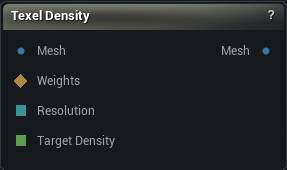
The Texel Density node
When to use it
Measures, and optionally equalises, texel density across the UV islands of one channel. Texel density is texels per centimetre of surface: Resolution * sqrt(UV area / 3D area).
Auto-unwrappers optimise for packing, not for this, so a generated atlas routinely gives a character's ear four times the texels per centimetre of the torso. That is invisible in the UV view and obvious the moment anything is baked or painted, which is why this is measured in numbers rather than eyeballed.
Normalising scales each island about its own UV centre, so islands can end up overlapping. Follow this node with Pack UVs in Preserve Relative Scale mode, which lays them out again without disturbing the density you just equalised. Fit To Unit Square below is the quick alternative when you only need the result inside the tile and do not care about overlap.
How to use it
- 1
Connect a mesh that already has UVs
- 2
Run in Measure Only and read the Result category
- 3
Switch to a Normalise mode and run again
Pins
| Pin | Type | Description |
|---|---|---|
Mesh |
Mesh | The mesh to measure. It needs UVs in the chosen channel already. |
Weights |
Weight Map | Optional. Work on only the islands this selection touches. Leave it empty for the whole mesh. |
Resolution |
Whole Number | Texture Resolution, taken from the graph instead of the details panel. |
Target Density |
Number | Target Texel Density in texels per centimetre, taken from the graph. Only read in Normalise To Target mode. |
| Pin | Type | Description |
|---|---|---|
Mesh |
Mesh | The mesh. Untouched in Measure Only, otherwise with the chosen channel's islands rescaled. The other channels come out untouched either way. |
Settings
| Setting | Type | Description |
|---|---|---|
UV Channel |
Whole number | Which UV channel to measure or rescale. The others come out untouched. |
Mode |
Choice | Report the numbers only, or rescale the islands as well. |
Texture Resolution |
Whole number | The texture size the density numbers are quoted against. Without it they mean nothing: the same UVs read 5 texels/cm at 512 and 20 at 2048. Set it to whatever you will actually bake at. Every density on this node is texels per centimetre in the app's own units. |
Target Texel Density |
Number | Texels per centimetre every island gets scaled to. 10.24 works out to 1024 texels per metre, which is where most game work starts. Centimetres means the app's own units, the same ones the viewport measures in. A mesh that was authored in metres and imported without a unit conversion reads a hundred times off, so check the scale before trusting the number. |
Fit To Unit Square |
True/False | After rescaling, shrink the whole layout as one piece so it lands back inside the tile. Every island moves by the same factor, so they stay equal to each other, but they are no longer the exact number you asked for. Off by default, since a Target run usually wants that exact number. Ignored while Weights is driving a selection: fitting only the islands you picked would centre that handful in the middle of the tile and park them on top of the ones you left alone. |
Selection Threshold |
Number | A vertex counts as selected once its weight reaches this. Only read when something is plugged into Weights. The selection grows out to whole islands first, because half an island has no density of its own. |
Available in Mesh Morpher Graph and Mesh Morpher Studio.