Studio and Graph
Utility
Graph plumbing: grouping work into subgraphs and other helpers that shape the graph itself rather than the mesh.
Mesh Morpher documentation
Studio and Graph
Graph plumbing: grouping work into subgraphs and other helpers that shape the graph itself rather than the mesh.
Studio and Graph › Utility
Pulls one mesh out of a Mesh Array by index and reports the array's length on a second output. This is the way back from batch work into ordinary single-mesh graphs. Wire the array in, drive Index ...
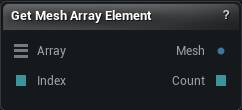
The Get Mesh Array Element node
Pulls one mesh out of a Mesh Array by index and reports the array's length on a second output. This is the way back from batch work into ordinary single-mesh graphs. Wire the array in, drive Index from a Math node, and everything downstream sees a normal mesh.
It recomputes whenever the array or the index changes.
When the array's bytes are parked in the .mmgraph file, only the element you ask for gets pulled off disk and decompressed. Indexing into a forty-head array does not wake the other thirty-nine.
| Pin | Type | Description |
|---|---|---|
Array |
Mesh List | The array to read out of. |
| Pin | Type | Description |
|---|---|---|
Mesh |
Mesh | The mesh you asked for, on a normal Mesh wire. |
Count |
Whole Number | How many meshes the array holds. Still correct even when Index points past the end. |
| Setting | Type | Description |
|---|---|---|
Element Index |
Whole number | Which mesh to read, counting from 0. |
Available in Mesh Morpher Graph and Mesh Morpher Studio.
Studio and Graph › Utility
Point it at a folder of mesh files, press Scan Directory, and the whole folder arrives on one wire instead of forty loaders. From there Get Mesh Array Element reaches in for one, or a headless -mmr...
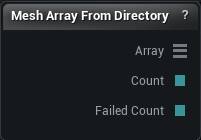
The Mesh Array From Directory node
Point it at a folder of mesh files, press Scan Directory, and the whole folder arrives on one wire instead of forty loaders. From there Get Mesh Array Element reaches in for one, or a headless -mmrun -mmin sweep processes the folder one file at a time.
| Pin | Type | Description |
|---|---|---|
Array |
Mesh List | Every mesh in the folder on one wire, sorted the same way on every machine. |
Count |
Whole Number | How many slots the array has, empty ones included. |
FailedCount |
Whole Number | How many files would not import. Anything above zero means the batch is short. |
| Setting | Type | Description |
|---|---|---|
Source Directory |
Text | Full path to the folder you want to read. Nothing is ever written there. |
Extension Filter |
Text | Which file types to pick up, separated by semicolons and written without dots, like obj;fbx. Leave it empty to take everything readable. Upper or lower case makes no difference. |
Recursive |
True/False | Also look inside folders within the one you picked. |
Max Files |
Whole number | Stop after this many files. 0 means no limit. Worth setting when you are not certain whether that folder holds forty meshes or ten thousand. |
Failure Policy |
Choice | What happens when one file will not import. |
Use T0 Pose |
True/False | FBX only. Bring in the bind pose instead of the first frame of animation. |
Coordinate System |
Choice | Handedness the files were exported with. Pick the wrong one and every mesh arrives mirrored. OBJ and FBX only. |
Front Axis |
Choice | Which axis points forward in the source files. OBJ and FBX only. |
Up Axis |
Choice | Which axis points up in the source files. Get it wrong and the whole batch comes in lying on its side. OBJ and FBX only. |
OBJ Sections From |
Choice | Which statements split an OBJ into material sections. OBJ marks materials with usemtl, so parts that reuse one material - or name none - would otherwise arrive merged into a single section. OBJ only. |
Available in Mesh Morpher Graph and Mesh Morpher Studio.
Studio and Graph › Utility
A knot on a wire. Values pass through unchanged, so a long route can bend around other nodes. Purely visual: no cost, no copy, no effect on evaluation.

The Reroute node
A knot on a wire. Values pass through unchanged, so a long route can bend around other nodes. Purely visual: no cost, no copy, no effect on evaluation.
Double-click an existing wire to drop one in place rather than adding it from the picker and re-wiring by hand.
Its pins start as wildcards and take on the type of whatever they are connected to, so wire colours stay correct and type checking stays exactly as strict as it would be without the knot. Remove the last wire and it goes back to wildcard.
| Pin | Type | Description |
|---|---|---|
Value |
Any | Anything at all. The knot does not touch it. |
| Pin | Type | Description |
|---|---|---|
Value |
Any | Exactly what went in. |
Available in Mesh Morpher Graph and Mesh Morpher Studio.
Studio and Graph › Utility
Collapses a group of nodes into one card so a big graph stays readable.

The Subgraph node
Collapses a group of nodes into one card so a big graph stays readable.
| Setting | Type | Description |
|---|---|---|
Subgraph Name |
Text | What the group is called, on the card and in the breadcrumb trail across the top of the graph. |
Available in Mesh Morpher Graph and Mesh Morpher Studio.