Studio and Graph › Texture
Transfer Texture
Resamples one mesh's textures into another mesh's UV layout by spatial correspondence, and it is the UDIM-aware one. Multiple source and target tiles work here, which Bake Maps and Project Texture ...
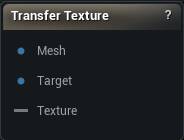
The Transfer Texture node
When to use it
Resamples one mesh's textures into another mesh's UV layout by spatial correspondence, and it is the UDIM-aware one. Multiple source and target tiles work here, which Bake Maps and Project Texture deliberately do not do. The target's tiles each get their own output pin.
How to use it
- 1
Connect the textured source mesh and the target mesh
- 2
Set the resolution and the two UV channels
- 3
Click Apply
Pins
| Pin | Type | Description |
|---|---|---|
Mesh |
Mesh | The mesh the incoming texture belongs to. |
Target |
Mesh | The mesh you want the texture rebuilt for. Its UVs decide the output layout. |
Settings
| Setting | Type | Description |
|---|---|---|
Texture Resolution |
Whole number | Size of each output tile, in pixels. |
Source UV Channel |
Whole number | Which UV channel on the source mesh the incoming texture is laid out in. |
UV Channel |
Whole number | Which UV channel on the target mesh the result is written into. |
Max Distance |
Number | How far a point on the target may sit from the source surface and still pick up colour, in world units. Too low and whole regions come out empty. Too high and a texel reaches across a gap and grabs the colour off the wrong side of a fold. |
Filter Quality |
Choice | How the source texture is sampled. |
Bicubic Sharpness |
Number | Shapes the bicubic filter. Despite the name, low values are the sharp end and can ring along hard edges; high values are the soft end. |
Fill Gaps |
True/False | Bleeds colour outward into empty pixels so UV seams do not show a dark edge. |
Gap Fill Iterations |
Whole number | How far the bleed reaches, in pixels. |
Content |
Choice | Color transfers image values. Tangent Space Normal rebakes an existing normal texture from the source tangent frame into the target frame, always with linear output. |
Projection |
Choice | Nearest surface or the closest hit along either target normal direction. Both meshes must share mesh coordinates. No cage mesh is used. |
Nearest On Ray Miss |
True/False | If both normal rays miss, allow a nearest-surface match within Max Distance. |
Flip Source Green |
True/False | Flip the source normal map green channel to switch OpenGL/DirectX convention. Default follows Unreal/DirectX. |
Flip Output Green |
True/False | Flip the output normal map green channel to switch OpenGL/DirectX convention. Default follows Unreal/DirectX. |
High Precision |
True/False | Preserve HDR and fractional precision in a linear half-float texture. |
Output SRGB |
True/False | Encode 8-bit color output as sRGB. High-precision and normal-map outputs are always linear. |
Learn more
| Texture transfer with Mesh Morpher Graph | Read the walkthrough on meshmorpher.com | https://meshmorpher.com/blog/texture-transfer-with-mesh-morpher-graph |
Available in Mesh Morpher Graph and Mesh Morpher Studio.