Studio and Graph › Texture
Bake VDM Brush
Turns a sculpt-on-a-plane into a vector displacement map any brush stamp can reuse at any size, on any surface. Overhangs are fine - that is the whole reason to reach for this over a height map.
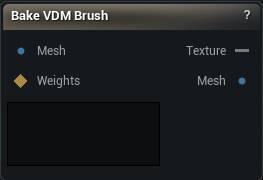
The Bake VDM Brush node
When to use it
Turns a sculpt-on-a-plane into a vector displacement map any brush stamp can reuse at any size, on any surface. Overhangs are fine - that is the whole reason to reach for this over a height map.
There is no separate Rest input: the flat state is read straight off the canvas's own UV layout, fitted back out from the sculpt itself.
How to use it
- 1
Create a flat plane and sculpt a shape on it
Use Sculpt Mesh. Overhangs and undercuts are fine.
- 2
Wire the sculpted Mesh here and press Bake VDM Brush
- 3
Wire the Texture output into the Displace tool
Vector Displacement mode.
Pins
| Pin | Type | Description |
|---|---|---|
Mesh |
Mesh | The sculpted canvas. There is no separate Rest input - the flat state is fitted straight out of this mesh's own UV layout. |
Weights |
Weight Map | Optional. Bakes only the weighted region, and a feathered selection feathers the stamp. Leave it unwired to bake the whole mesh. |
| Pin | Type | Description |
|---|---|---|
Texture |
Asset | The baked vector displacement map. Feed it to the Displace tool's Vector Displacement mode. |
Mesh |
Mesh | The mesh that was baked, passed through unchanged. |
Settings
| Setting | Type | Description |
|---|---|---|
Resolution |
Choice | Size of the baked map. |
UV Channel |
Whole number | Which UV channel on Mesh supplies the texel layout, and in Auto Frame Mode the stamp's U axis. |
Gutter Size |
Whole number | Texels of bleed painted outside the UV island, so bilinear sampling at the island edge does not pull in black from outside it. |
Border Feather |
Number | Radial falloff to zero at the inscribed circle of the canvas, so a square UV island bakes to a map a circular brush stamp can use without a hard seam at the corners. |
Frame Mode |
Choice | How the stamp's tangent frame is derived. Auto is correct for the overwhelming majority of canvases; Explicit exists for a plane whose UV layout does not run where you want the frame to. |
Frame U |
Vector | World-space direction that becomes the stamp's U (right) axis. |
Frame Normal |
Vector | World-space direction that becomes the stamp's outward normal. |
Normalization Mode |
Choice | How a world-space offset is scaled into the file's footprint-diameter units. Auto is correct unless Mesh is not the actual canvas - a tiny reference swatch cut from a larger sheet, for instance. |
Footprint Size |
Number | The stamp footprint diameter, in Mesh's own world units. |
Save To Library |
True/False | Also write the baked map as an EXR into your brush library, so it shows up in every project's Displace tool, not just this graph. |
Library Name |
Text | File name, without extension, that the library copy is written under. Existing files with the same name are overwritten. |
Learn more
| Texture transfer with Mesh Morpher Graph | Read the walkthrough on meshmorpher.com | https://meshmorpher.com/blog/texture-transfer-with-mesh-morpher-graph |
Available in Mesh Morpher Graph and Mesh Morpher Studio.