Studio and Graph › Skeleton
Fit Skeleton
The geometry is right and the skeleton is still sitting where the original character's joints were. This moves the bones to match. It is the step after a body-shape change, a wrap or a non-rigid fit.
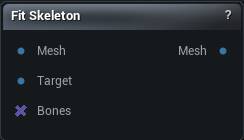
The Fit Skeleton node
When to use it
The geometry is right and the skeleton is still sitting where the original character's joints were. This moves the bones to match. It is the step after a body-shape change, a wrap or a non-rigid fit.
How to use it
- 1
Connect the rigged mesh and its reshaped version
- 2
Set Start Bone, and list anything that should stay put
- 3
The output updates on its own as the meshes or settings change
Pins
| Pin | Type | Description |
|---|---|---|
Mesh |
Mesh | The rigged mesh whose joints get moved. |
Target |
Mesh | The reshaped version of that same mesh. Same vertex count and order. |
Bones |
Bone Selection | Optional. Wire a bone list here to fit only those and leave the rest alone. |
| Pin | Type | Description |
|---|---|---|
Mesh |
Mesh | The mesh with its joints moved to fit. |
Settings
| Setting | Type | Description |
|---|---|---|
Start Bone |
Text | The first bone that gets fitted. Anything ahead of it in the skeleton stays put. Usually "root", which fits the whole rig. Point it at the pelvis to leave the root and its motion bones alone. |
End Bone |
Text | Nothing reads this. The fit runs from Start Bone to the end of the skeleton, so to spare a bone put it in Ignore Bones or wire the Bones pin instead. |
Ignore Bones |
Text | Bones to leave exactly where they are, one per row. Names have to match exactly. Shift+Enter adds a row. |
Ignore String |
Text | Leave alone any bone whose name contains one of these, one per row. Quickest way to skip every twist or corrective joint at once. Keep the fragments long enough to be specific: "l_" catches half the rig. |
Orient Bones |
Text | Bones that also get re-aimed at their child once the fit has moved everything, one per row. Limb bones want this. Without it a forearm whose wrist has moved keeps its old rotation, and the twist shows up as a pinched elbow. |
Orient Bones Above Bone |
Text | Re-aim every bone that comes after this one in the skeleton's bone order too, on top of the list above. Leave it empty to use the list alone. |
Bone To Vertex Threshold |
Number | How far a vertex can sit from a joint and still be used to work out where that joint should move to. Only comes into play for joints the surface itself could not guide. |
Bone To Bone Threshold |
Number | How close a joint has to sit to the line between two other joints before it counts as riding on that segment. Only used when Preserve Relative Bone Transforms is on. |
Max Distance To Surface |
Number | How far from the surface a joint can be and still be moved by the surface right underneath it. Joints deeper than this fall back to averaging nearby vertices, which is looser. Raise it on a chunky character whose spine sits well inside the body. |
Use Vertex Weights |
True/False | Use the mesh's skin weights to decide which vertices belong to a joint that sits too deep for the surface to guide. On a mesh with junk weights this drags joints toward whatever happens to be weighted to them, so turn it off there. |
Preserve Relative Bone Transforms |
True/False | Keep a joint that sat on top of another bone's segment stuck to that segment after the fit, instead of letting it drift off the line. |
Vertex Sample Size |
Whole number | How many nearby vertices to average when a joint has to fall back to proximity. Small numbers make the joint chase one lump of geometry. |
Always Match Geometry |
True/False | After fitting, snap the output vertices onto Target so the shape matches exactly. Turn it off and you get whatever the skinning produced, which drifts from Target. |
Advanced Skeleton Fitting |
True/False | Adds a solver pass that works the joints out from the skin weights rather than just sliding them to follow the surface. Slower, and only bones with vertices actually weighted to them use its result. |
Global Iterations |
Whole number | Passes the solver spends building its starting guess before the main loop. |
Iterations |
Whole number | Main solver passes. More costs time and settles closer, then stops helping. |
Transformation Iterations |
Whole number | Passes spent on the bone transforms inside each main pass. |
Affinity |
Whole number | Strength of the solver's soft affinity constraint. |
Affinity Normalization |
Number | How that affinity constraint is normalised. |
Auto Orient Bones |
True/False | Automatically orient surface-fitted bones toward a child, preserving existing twist. |
Learn more
| Morph full body MetaHumans and skeletons | Read the walkthrough on meshmorpher.com | https://meshmorpher.com/blog/morph-full-body-meta-humans-and-skeletons |
Available in Mesh Morpher Graph and Mesh Morpher Studio.