Studio and Graph › Selection
Save Landmarks
Writes one side of a Landmarks wire out to a Graph Landmarks asset on disk, the way the classic Mesh Morpher wrapper saved control points. A hand-placed set that took real time to author is worth k...
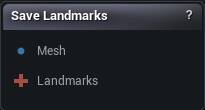
The Save Landmarks node
When to use it
Writes one side of a Landmarks wire out to a Graph Landmarks asset on disk, the way the classic Mesh Morpher wrapper saved control points. A hand-placed set that took real time to author is worth keeping, so a later graph can start from it instead of from nothing.
Side picks whether the source or the target points get stored. The pairs are not symmetric, so saving the wrong side leaves you with a file of points that belong to the other mesh.
Saving happens from the node, not from a wire changing.
How to use it
- 1
Connect the mesh and the landmarks
- 2
Select the side to save
Left is the source, Right is the target.
- 3
Toggle the Save property to write the file
Pins
| Pin | Type | Description |
|---|---|---|
Mesh |
Mesh | Optional, but worth wiring. Each landmark records where it sits in this mesh's UVs, which is what lets the saved set be placed by UV later. |
Landmarks |
Landmarks | The landmarks to write out. |
Settings
| Setting | Type | Description |
|---|---|---|
Side |
Choice | Which half of each pair gets saved. Left is the source side, Right is the target side. |
Available in Mesh Morpher Graph and Mesh Morpher Studio.