Studio and Graph › Repair
Fix Symmetry
Takes a nearly symmetric mesh and makes it exactly symmetric. Each vertex finds its mirror partner across the plane and the pair is averaged, so both halves keep their detail and every vertex moves...
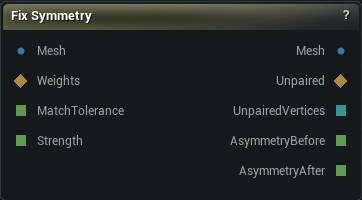
The Fix Symmetry node
When to use it
Takes a nearly symmetric mesh and makes it exactly symmetric. Each vertex finds its mirror partner across the plane and the pair is averaged, so both halves keep their detail and every vertex moves by half the disagreement instead of one side being overwritten by the other. On a scan that beats mirroring geometry, because nothing gets thrown away.
How to use it
- 1
Wire the scan into Mesh and pick the Axis
X for a head facing +Y.
- 2
Press Fix Symmetry
Read Asymmetry Before / After in the details panel.
- 3
If Unpaired Vertices is not zero, find out where
Wire the Unpaired output into a mask to see the gaps, then either raise Match Tolerance or fix the crop upstream.
- 4
Paint a Weights mask when part of the mesh should stay lopsided
A pair moves by the lower of its two weights, so paint the region on both sides of the plane. A vertex painted 0 never moves and holds its partner still as well, which is what keeps "unpainted means untouched" true for the whole mesh rather than only for the half you happened to paint.
Pins
| Pin | Type | Description |
|---|---|---|
Mesh |
Mesh | The nearly-symmetric mesh. Passes straight through until you press Fix Symmetry. |
Weights |
Weight Map | Optional mask scaling how far each vertex moves, so you can straighten a face without touching a deliberately lopsided hairstyle. A pair moves by the lower of its two weights, so paint both sides of the region you want fixed - a vertex painted 0 is never moved, and neither is its partner. Unconnected means full strength everywhere. |
MatchTolerance |
Number | Partner search radius, as a fraction of the bounds diagonal. Leave it unconnected to use the value in the details panel. |
Strength |
Number | How far each vertex travels toward the symmetric average, 0 to 1. Leave it unconnected to use the value in the details panel. |
| Pin | Type | Description |
|---|---|---|
Mesh |
Mesh | The symmetrised mesh. Only positions moved - vertex count, order and every attribute are untouched. |
Unpaired |
Weight Map | 1.0 on every vertex that found no mirror partner and was left where it was, 0.0 everywhere else. Wire it into a mask to see the gaps. |
UnpairedVertices |
Whole Number | How many vertices had no mirror partner. Zero means everything paired up. |
AsymmetryBefore |
Number | Largest gap, in cm, between a vertex and the mirror of its partner before the fix. |
AsymmetryAfter |
Number | The same measurement after the fix. Zero, to floating point, at full Strength. |
Settings
| Setting | Type | Description |
|---|---|---|
Axis |
Choice | The axis the mirror plane faces along. X mirrors left to right for a head looking down +Y, which is the app's front. None is refused rather than quietly doing nothing. |
Plane Origin |
Choice | Which point the mirror plane passes through. |
Plane Offset |
Vector | Nudges the plane off that point, in cm. Only the component along Axis does anything; the other two just slide the plane around inside itself. |
Correspondence |
Choice | How each vertex finds its mirror partner. Nearest Vertex matches the other half's vertices. Closest Point On Surface matches the mirrored position onto the mesh itself, which is what a scan needs when the two halves were tessellated independently. |
Match Tolerance Fraction |
Number | How far from its mirrored position a partner may sit, as a fraction of the bounds diagonal, so one number works on a 2 cm ear and a 200 cm body. It has to be bigger than the asymmetry you are fixing or nothing pairs at all, and smaller than the gap between neighbouring vertices or a vertex grabs its partner's neighbour instead and the fix smears detail sideways. One percent of the diagonal clears typical scan asymmetry with room left. On a dense scan that one percent is larger than the neighbour spacing, so Limit Match To Spacing (on by default) also caps the search at a few mean edge lengths. Closest Point On Surface uses the same radius against the mirrored surface rather than the nearest vertex. Clamped at a quarter of the diagonal: past that the search radius covers a large fraction of the mesh, every query returns most of the other side and the pairing stops being a mirror match at all - while the cost climbs toward comparing every vertex with every other one. The clamp also bounds what a value driven in through the Match Tolerance pin can do. |
Limit Match To Spacing |
True/False | Cap the partner search at a few mean edge lengths. The default 1% of the bounds diagonal is larger than neighbour spacing on a dense scan and the extra radius is how a vertex grabs its partner's neighbour and smears detail. Off restores a pure diagonal fraction. |
Max Match Edge Lengths |
Number | Search radius in mean edge lengths, used only while Limit Match To Spacing is on. 1.5 keeps the query inside the first ring of neighbours. |
Seam Tolerance Fraction |
Number | Vertices this close to the plane, as a fraction of the bounds diagonal, count as seam vertices and pair with themselves. They need their own rule: a seam vertex's mirrored position lands within Match Tolerance of both itself and its neighbours across the plane, so it would otherwise compete for a partner it must not have. Note the band between this and Match Tolerance: a vertex just outside the seam whose true partner sits just inside it cannot pair, because seam vertices are deliberately kept out of the partner search. Those vertices are reported as unpaired (count, Unpaired map and node warning) rather than quietly skipped, so the usual symptom is a thin ring of unpaired vertices hugging the plane. Lower Seam Tolerance until it clears. |
Snap Seam To Plane |
True/False | Pull seam vertices exactly onto the plane. Off leaves them where they are, which keeps a deliberately off-plane seam intact but means the result is not exactly symmetric along it. |
Strength |
Number | How far each vertex travels toward the symmetric average. 1 lands exactly symmetric; lower closes part of the gap and leaves the mesh measurably straighter without being exact. |
Available in Mesh Morpher Graph and Mesh Morpher Studio.