Studio and Graph › MetaHuman DNA
Bake DNA Geometry
Writes edited mesh and skeleton data back into a DNA, optionally propagating the change to higher LODs and carrying morph targets along. This ends the round trip that DNA To Mesh starts, the way Ba...
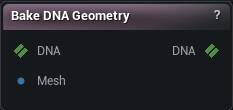
The Bake DNA Geometry node
When to use it
Writes edited mesh and skeleton data back into a DNA, optionally propagating the change to higher LODs and carrying morph targets along. This ends the round trip that DNA To Mesh starts, the way Bake Mesh ends a mesh round trip.
How to use it
- 1
Build the mesh with DNA To Mesh, sculpt it, wire it into Mesh
- 2
Set LOD Index to the LOD you built from and pick what to write
- 3
Press Bake DNA
Keep the vertex count the same and the bake is exact. Change it and the DNA meshes are rebuilt from scratch, which is when Transfer Morph Targets and Quad Export start to matter and LOD propagation stops working. Rename or add bones and the bake refuses outright: the joint names on your mesh have to be the ones the DNA already knows.
Pins
| Pin | Type | Description |
|---|---|---|
DNA |
DNA | The DNA to write into. |
Mesh |
Mesh | The sculpted mesh. Its positions, normals and bone poses become the DNA's new neutral shape. Bone names must still match the DNA's own. |
| Pin | Type | Description |
|---|---|---|
DNA |
DNA | The DNA with your mesh baked in. |
Settings
| Setting | Type | Description |
|---|---|---|
LOD Index |
Whole number | Which LOD of the DNA your mesh replaces. Has to be an LOD the file actually has, and it has to be the one you built the mesh from. |
Bake Skeleton |
True/False | Write the mesh's bone positions back as the DNA's rest skeleton. Only bones the DNA already names are touched; new bones on your mesh are ignored. |
Bake Mesh Data |
True/False | Write the vertex positions and normals. Turn it off to bake nothing but the skeleton. |
Bake UVs |
True/False | Write your edited UVs too. Only bites while the vertex count is unchanged; a rebuilt mesh brings its UVs across whatever you set here. Vertex colours are lost either way, since DNA has nowhere to keep them. |
Bake Skin Weights |
True/False | Write your edited skin weights too. Turn it off to keep the weights the DNA already had: with the vertex count unchanged they are kept exactly, and on a rebuilt mesh each new vertex takes weights blended from the closest point on the old surface. The same carry-over runs when this is on but your mesh has no weights at all, and the node warns about any vertex it found nothing to copy from. |
Remove Scaling |
True/False | Strip scale off every bone before writing, keeping only where it sits and how it is turned. Reach for this when a scaled rig writes a mesh that comes back the wrong size. |
Remove Meshes Missing From Input |
True/False | What happens to a DNA mesh of the baked LOD that the input mesh does not carry (no section with its name and no section at its position). Off (default): the mesh is kept in the LOD exactly as it was - bake only what you wired, e.g. a head-only mesh leaves teeth, eyes and eyelashes untouched. On: the mesh is removed from the baked LOD's mesh list, for the case where you deliberately deleted that section from the mesh. Removal only unlinks the mesh from this LOD; its data stays in the file and other LODs keep their own copies. |
Transfer Morph Targets |
True/False | Only matters when your mesh changed the vertex count. Carries the existing blendshapes over onto the rebuilt geometry, matching each part of the mesh up by name. Turn it off and every blendshape in the file is wiped, which is what you want when the old shapes no longer fit the new mesh. |
Apply To LODs |
True/False | Also push the change onto every coarser LOD, by projecting it down from the one you baked. Ignored when your mesh changed the vertex count, since there is then nothing to project from. |
Vertex Threshold |
Number | How far the projection may reach to find the matching vertex on each coarser LOD. Too low and stretches of the LOD stay unchanged. Too high and the change jumps a gap onto the wrong side of a fold. |
Normal Incompatibility Threshold |
Number | How far a triangle may face away from the one it matched before the projection refuses it. This is what stops LOD triangles turning inside out. |
Smooth Type |
Choice | How the projected result is smoothed on each coarser LOD. Preserve UV Flow keeps the smoothing from dragging across UV seams. |
Smooth Strength |
Number | How hard each smoothing pass pulls. Push it up and the projected detail flattens out. |
Smooth Iterations |
Whole number | How many smoothing passes to run. Zero, the default, means none: raise it only when the projected LOD comes out lumpy. |
Quad Export |
True/False | Only matters when your mesh changed the vertex count and the DNA meshes get rebuilt. Pairs triangles back into quads on the way out, so the written mesh reads the way DNA meshes normally do rather than as raw triangles. |
Respect UV Seams |
True/False | Never pair two triangles across a UV seam. |
Respect Hard Normals |
True/False | Never pair two triangles across a hard edge. |
Quad Metric Clamp |
Number | Ceiling on how bad a pairing the quad search will still accept. Lower it and only clean, square pairs survive; the rest go out as triangles. |
Quad Adjacency Weight |
Number | How much the quad search cares about lining its quads up with the ones next to them, rather than judging each pair on its own. |
Quad Search Rounds |
Whole number | How many passes the quad search makes. More passes tidy up the leftover triangles at the cost of bake time. |
Learn more
| Modify MetaHuman RBF poses | Read the walkthrough on meshmorpher.com | https://meshmorpher.com/blog/modify-metahuman-rbf-poses |
| Modify DNA bone expressions | Read the walkthrough on meshmorpher.com | https://meshmorpher.com/blog/modify-meta-human-dna-bone-expressions-with-mesh-morpher |
| Custom DNA topology | Read the walkthrough on meshmorpher.com | https://meshmorpher.com/blog/custom-dna-topology-with-mesh-morpher-graph |
Available in Mesh Morpher Graph and Mesh Morpher Studio.