Studio and Graph
Math
Scalar maths for driving other nodes: arithmetic, clamping, interpolation and comparisons on plain numbers.
Mesh Morpher documentation
Studio and Graph
Scalar maths for driving other nodes: arithmetic, clamping, interpolation and comparisons on plain numbers.
Studio and Graph › Math
Holds a value between a minimum and a maximum.
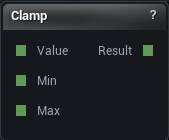
The Clamp node
Holds a value between a minimum and a maximum.
Its job is making a computed setting safe before it drives a mesh node. A triangle budget derived from a measurement can legitimately come out at zero or at ten million, and clamping is how the graph stays inside the range you tested.
A node that clamps internally gives you no signal that the value was out of range. This one keeps the intent on the canvas where you can see it.
Set Min above Max and it publishes nothing and says so, rather than handing back Max for every input.
| Pin | Type | Description |
|---|---|---|
Value |
Number | The number to keep in range. Leave it unwired and the panel value is used. |
Min |
Number | The floor. Leave it unwired and the panel value is used. |
Max |
Number | The ceiling. Leave it unwired and the panel value is used. |
| Pin | Type | Description |
|---|---|---|
Result |
Number | The number, pulled back inside Min and Max. |
| Setting | Type | Description |
|---|---|---|
Value |
Number | The number to keep in range. The Value pin overrides it. |
Min |
Number | The floor. Set it above Max and the node goes red instead of guessing. |
Max |
Number | The ceiling. |
Available in Mesh Morpher Graph and Mesh Morpher Studio.
Studio and Graph › Math
One floating-point number on a wire, so a single value can drive several nodes at once.
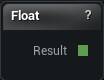
The Float node
One floating-point number on a wire, so a single value can drive several nodes at once.
Whenever the same number has to appear in two places and stay in step - a tolerance, a strength, a resolution - this keeps it visible on the canvas. A details-panel value typed twice is not.
Wire it into any node setting that offers an override pin. That node's own property then stops being used, which is why a setting that ignores your edits usually has a wire on it.
| Pin | Type | Description |
|---|---|---|
Result |
Number | The number. Wire it into any setting that has an override pin. |
| Setting | Type | Description |
|---|---|---|
Value |
Number | The number this node hands out. |
Available in Mesh Morpher Graph and Mesh Morpher Studio.
Studio and Graph › Math
A whole-number constant, for the counts and budgets that have to be integers: triangle targets, iteration counts, LOD levels, seeds.
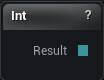
The Int node
A whole-number constant, for the counts and budgets that have to be integers: triangle targets, iteration counts, LOD levels, seeds.
It does the same job Float does, for the same reason. One place to change the number.
Reach for the int version where the consumer takes an int, so what arrives is the value you typed rather than something a float-to-int conversion rounded on the way.
| Pin | Type | Description |
|---|---|---|
Result |
Whole Number | The number. Wire it into any setting that has an override pin. |
| Setting | Type | Description |
|---|---|---|
Value |
Whole number | The number this node hands out. |
Available in Mesh Morpher Graph and Mesh Morpher Studio.
Studio and Graph › Math
Blends from A to B by Alpha. 0 gives you A, 1 gives you B.
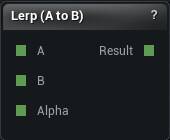
The Lerp (A to B) node
Blends from A to B by Alpha. 0 gives you A, 1 gives you B.
Dial a computed setting between two values you trust, or drive one number from another node's normalised output.
Alpha is not clamped, on purpose, so anything outside 0 to 1 extrapolates past the endpoints. If that is not what you want, put a Clamp in front of the alpha rather than expecting this node to contain it.
| Pin | Type | Description |
|---|---|---|
A |
Number | What you get at Alpha 0. Leave it unwired and the panel value is used. |
B |
Number | What you get at Alpha 1. Leave it unwired and the panel value is used. |
Alpha |
Number | How far along you are between A and B. Go past 0 or 1 and it keeps going. |
| Pin | Type | Description |
|---|---|---|
Result |
Number | A blended towards B. |
| Setting | Type | Description |
|---|---|---|
A |
Number | What you get at Alpha 0. The A pin overrides it. |
B |
Number | What you get at Alpha 1. The B pin overrides it. |
Alpha |
Number | How far along you are between A and B. Nothing stops you going past either end. |
Available in Mesh Morpher Graph and Mesh Morpher Studio.
Studio and Graph › Math
Adds, subtracts, multiplies or divides two numbers. This is how a graph computes a setting from another value instead of hard-coding it: half the source triangle count, twice the measured distance.
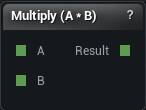
The Scalar Math node. Its title follows the operation you pick.
Adds, subtracts, multiplies or divides two numbers. This is how a graph computes a setting from another value instead of hard-coding it: half the source triangle count, twice the measured distance.
Divide by zero is reported as a node error and publishes nothing, rather than emitting an infinity or a silent zero. An infinity travelling into a mesh operation as an edge length or a vertex budget would blow up there, and you would blame the mesh node.
When nothing is published, the consumer falls back to its own setting. That is what a downstream node quietly ignoring its wire looks like.
| Pin | Type | Description |
|---|---|---|
A |
Number | The number on the left of the sum. Leave it unwired and the panel value is used. |
B |
Number | The number on the right of the sum. Leave it unwired and the panel value is used. |
| Pin | Type | Description |
|---|---|---|
Result |
Number | The answer. |
| Setting | Type | Description |
|---|---|---|
Operation |
Choice | Which sum to do with A and B. |
A |
Number | The number on the left of the sum. The A pin overrides it. |
B |
Number | The number on the right of the sum. The B pin overrides it. |
Available in Mesh Morpher Graph and Mesh Morpher Studio.