Studio and Graph › Importers
Load Geometry Cache
Editor-only node. Runs only in Mesh Morpher Graph inside the Unreal Editor, because it reads or writes Unreal Engine assets. Not available in the standalone Mesh Morpher Studio app.
Editor-only node. Runs only in Mesh Morpher Graph inside the Unreal Editor, because it reads or writes Unreal Engine assets. Not available in the standalone Mesh Morpher Studio app.
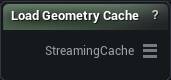
The Load Geometry Cache node
When to use it
Reads a Geometry Cache asset already in your project as a streaming pin. This is the project-asset counterpart to Load Alembic File and Load USD File, and its frames arrive already oriented for MeshMorpher, so there is nothing to convert.
How to use it
- 1
Pick a geometry cache asset
- 2
Wire the StreamingCache output onward
Into Geometry Cache Sculpt, Get Streaming Geometry Cache Frame, or an export node.
Pins
| Pin | Type | Description |
|---|---|---|
StreamingCache |
Streaming Geometry Cache | The asset's frames, ready for the sculpt, frame and export nodes. |
Settings
| Setting | Type | Description |
|---|---|---|
Geometry Cache |
Asset | The Geometry Cache asset to read. Frames come in already oriented for MeshMorpher, so there is nothing to convert. |
Available in Mesh Morpher Graph only. Compare the products.