Studio and Graph › Geometry
Remesh
Rebuilds the surface with evenly sized triangles at a target edge length. When a mesh has to deform well under a sculpt, a wrap or delta mush, and its triangles are wildly uneven, this is the fix.
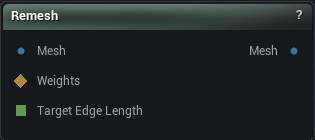
The Remesh node
When to use it
Rebuilds the surface with evenly sized triangles at a target edge length. When a mesh has to deform well under a sculpt, a wrap or delta mush, and its triangles are wildly uneven, this is the fix.
Pins
| Pin | Type | Description |
|---|---|---|
Mesh |
Mesh | The mesh to rebuild. |
Weights |
Weight Map | Optional mask limiting where the rebuild happens. Leave it empty and the whole mesh is rebuilt. |
Target Edge Length |
Number | Drives the target edge length from the graph. Leave it empty to use the value in the panel. |
| Pin | Type | Description |
|---|---|---|
Mesh |
Mesh | The rebuilt mesh, with triangles close to your target edge length. |
Settings
| Setting | Type | Description |
|---|---|---|
Selection Threshold |
Number | The weight a vertex has to beat to count as part of the region being rebuilt. A painted mask fades off gradually, but a triangle is either rebuilt or it is not, so this is where that soft edge turns into a hard yes or no. At 0, any vertex with any paint on it counts. |
Smoothing Type |
Choice | How the new vertices are relaxed as the mesh rebuilds. |
Smooth Speed |
Number | How hard each pass relaxes the new vertices. Set it to 0 to skip smoothing entirely. |
Enable Reproject |
True/False | Pull the rebuilt surface back onto the original shape as it goes. Turn this off and the mesh slowly deflates, because every pass of smoothing shaves a little more off the form. |
Projection Quality |
Whole number | How many times the reference copy of the original is split before the rebuilt mesh is snapped back onto it. 0 snaps onto the mesh exactly as it came in. 2 or 3 is plenty; past that you are paying memory and time for nothing. |
Inline Project |
True/False | Snap vertices back to the original the moment they move, rather than once per pass at the end. Slower, since it cannot run across threads, but it stops the surface wandering on shapes with tight folds. |
Remesh Iterations |
Whole number | How many passes to run. More passes even the triangles out further, and each one costs time. |
Target Edge Length |
Number | The edge length to aim for, in world units. A sensible starting value is measured off the mesh when you connect it. Halving this roughly quadruples the triangle count. |
Constrain To Selection Interior |
True/False | Keep the rebuild strictly inside the masked region and leave its border alone. Turn it off to let the work spill outward and blend into the triangles around it. |
Remeshing Exterior Region Width |
Whole number | How many rings of triangles beyond the mask get pulled in when the rebuild is allowed to spill over. Only does anything with the setting above turned off. |
Allow Flips |
True/False | Let the remesher swap the shared edge of two triangles. It evens the mesh out, but crisp edge lines get chewed away in the process. |
Allow Splits |
True/False | Let the remesher split edges that are longer than the target. |
Allow Collapses |
True/False | Let the remesher collapse edges that are shorter than the target. |
Preserve Sharp Edges |
True/False | Hold the mesh's seams instead of collapsing or smoothing across them, so hard edges and UV island borders survive the rebuild. |
Prevent Normal Flips |
True/False | Refuse any edit that would turn a triangle inside out. Off, you get black patches where a few faces ended up facing backwards. |
Prevent Tiny Triangles |
True/False | Refuse edits that would leave needle-thin slivers behind. Those read as speckled shading and give trouble to everything downstream. |
Reproject Constraints |
True/False | Snap vertices on locked borders back onto the original border curve, so a boundary keeps its exact shape instead of gradually cutting the corners off. |
Boundary Corner Angle Threshold |
Number | How sharp a turn in a border has to be before it counts as a corner. Corners get pinned once Reproject Constraints is on, so lower this when corners are still being rounded away. |
Mesh Boundary |
Choice | What may happen to open edges: Fixed leaves them exactly as they are, Refine only splits them, Free lets them move. |
Group Boundary |
Choice | What may happen to the edges between polygroups. Ignore drops the border entirely and lets triangles cross it. |
Material Boundary |
Choice | What may happen to the edges between material sections. Anything other than Fixed lets a section border drift, which shows up as one material creeping onto the wrong part of the model. |
Available in Mesh Morpher Graph and Mesh Morpher Studio.