Studio and Graph › Geometry
Guided Delta Mush
Delta Mush with a per-vertex weight map for strength. Painted regions relax to nothing, unpainted regions come out bit for bit untouched. That selectivity is why it sits next to the plain Delta Mus...
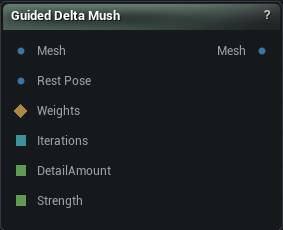
The Guided Delta Mush node
When to use it
Delta Mush with a per-vertex weight map for strength. Painted regions relax to nothing, unpainted regions come out bit for bit untouched. That selectivity is why it sits next to the plain Delta Mush node.
Local damage on a scan is this node's job, and the map can come from your hand or from Distortion Mask or Mesh Diff. Fixing skinning across a whole character, with a rest pose to work from, is the other node.
Detail Amount is the control that matters. At 0 you get pure Laplacian smoothing and the detail is gone. At 1 the surface is unchanged when there is no rest pose to take detail from. Wire a RestPose of the same vertex count and order to get classic detail-transfer Delta Mush.
Skin Sliding, Strain Falloff and Extreme Rotation are missing on purpose. All three measure how far a posed mesh has rotated or stretched from its rest pose, and the main mode here has no rest pose to measure against. When you have both poses and need them, use Delta Mush.
How to use it
- 1
Wire the scan into Mesh
- 2
Wire a Weights map into Weights - a painted mask, or the output of a Distortion Mask / Mesh Diff node so the relax follows the measurement
- 3
Lower Detail Amount until the noise goes
0 is plain smoothing; 1 changes nothing at all when no rest pose is wired.
- 4
Press Apply
Wire a rest pose into Rest Pose to get classic Delta Mush instead: the detail comes off the rest mesh and gets replayed on the smoothed input, which is the fix for skinning collapse at a joint. The two meshes need matching vertex count and order.
Pins
| Pin | Type | Description |
|---|---|---|
Mesh |
Mesh | The mesh to relax. Passes straight through until you press Apply. |
RestPose |
Mesh | Optional rest-pose mesh with matching vertex count and order. Wired, you get classic Delta Mush: rest detail replayed on the smoothed input. Unwired, the mesh supplies its own detail and Detail Amount turns into a detail-retention dial. |
Weights |
Weight Map | Per-vertex strength, 0 to 1. A vertex at 0 is not moved at all. Leave it unconnected for full strength everywhere. |
Iterations |
Whole Number | Smoothing passes. Leave it unconnected to use the value in the details panel. |
DetailAmount |
Number | How much detail survives, 0 to 1. Leave it unconnected to use the value in the details panel. |
Strength |
Number | Global multiplier on the weights, 0 to 1. Leave it unconnected to use the value in the details panel. |
| Pin | Type | Description |
|---|---|---|
Mesh |
Mesh | The relaxed mesh. Only positions moved - vertex count, order and every attribute are untouched. |
Settings
| Setting | Type | Description |
|---|---|---|
Iterations |
Whole number | Smoothing passes used to build the relaxed reference. More passes reach further across the surface, so this decides how big a lump gets flattened, not how much of it goes. Detail Amount is the how-much. Stops at 2000. Every pass walks the whole mesh, and this value can be driven from the Iterations pin by any upstream Math node - a stray 1e8 arriving there does not make a slow run, it makes one that never finishes. The surface stops changing long before the cap. |
Smooth Step |
Number | How far a vertex slides toward its neighbours' average each pass. Capped at 1 because past that every pass overshoots and the surface blows up on any mesh with irregular vertex fans, which is every scan. |
Weight Type |
Choice | Which neighbour weighting the smoothing uses. Defaults to Uniform here, not Cotangent like the Delta Mush node, because a raw scan is made of obtuse triangles and cotangent weights go negative on those - a negative weight shoves a vertex away from its neighbours and amplifies the very noise you came here to remove. |
Amount |
Number | How much of the original fine detail goes back on after smoothing. 0 leaves you the smoothed surface with the detail gone. 1 puts all of it back, which with no Rest Pose wired is an exact no-op, because there is no other mesh to take detail from; with a Rest Pose, 1 is classic Delta Mush. |
Frame Smoothing |
Whole number | Extra smoothing over the per-vertex frames the detail rides in. Does nothing at all unless a Rest Pose is wired. With one, raising it calms detail jitter where the two smoothed surfaces disagree about which way the surface runs. |
Inward |
Number | How far the smoothing may push a vertex inward, against its normal. 0 stops nose tips and knuckles flattening out; 1 is unrestricted. |
Outward |
Number | How far the smoothing may push a vertex outward, along its normal. 0 stops eye sockets and nostrils filling in; 1 is unrestricted. |
Edge Preservation |
Number | Caps how far a vertex may move straight toward its neighbours' average: 0 is no protection, 1 blocks that direction entirely. Thin things - ear rims, eyelash cards, fingers - collapse in on themselves under hard smoothing because every pass pulls both sides together. This holds that back while sideways smoothing keeps working. |
Preserve Boundaries |
True/False | Ease off the smoothing at open borders. On by default: a border has no neighbours on one side, so every pass drags it inward and the mesh shrinks a little more. |
Weight |
Number | How hard the border is held. 1 pins it bit-for-bit where it started, 0 smooths it like everything else, and in between each pass pulls it back partway. |
Strength |
Number | Global multiplier on the per-vertex weights. With nothing wired into Weights, this is the strength, applied everywhere. |
Available in Mesh Morpher Graph and Mesh Morpher Studio.