Studio and Graph › Geometry
Append Geometry
Clothing, a prop, a repaired patch. This merges a second mesh into the first and handles the awkward parts on the way: skin weights, skeleton merging, material slot remapping.
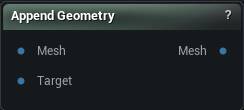
The Append Geometry node
When to use it
Clothing, a prop, a repaired patch. This merges a second mesh into the first and handles the awkward parts on the way: skin weights, skeleton merging, material slot remapping.
How to use it
- 1
Connect the base mesh and the mesh to append
- 2
Pick how the added geometry gets its weights
- 3
The output is the combined mesh
Pins
| Pin | Type | Description |
|---|---|---|
Mesh |
Mesh | The mesh you are adding to. It keeps its own skeleton and weights. |
Target |
Mesh | The geometry being added. It gets moved onto the first mesh's skeleton. |
| Pin | Type | Description |
|---|---|---|
Mesh |
Mesh | Both meshes as one, carrying the material slots from each. |
Settings
| Setting | Type | Description |
|---|---|---|
Append Weights Method |
Choice | How the added geometry gets its skin weights: none at all, rigidly bound to one bone, transferred off the base mesh, or by merging the two skeletons together. |
Weight Boundary Vertex Threshold |
Number | Open-edge vertices on the added geometry that land within this distance of a base-mesh vertex copy that vertex's weights exactly, so the seam does not tear open when the rig moves. Set to 0 to skip the pass. |
Parent Bone |
Text | Every vertex of the added geometry is bound to this one bone at full weight. Good for props, armour plates, anything that should ride along without deforming. |
Use Target Main Skeleton |
True/False | Merge into the added mesh's skeleton instead of the base mesh's, so its bone order and hierarchy win. |
Transfer By UV Match |
True/False | Match vertices by UV rather than by distance. Worth turning on when both meshes share a UV layout - it does not get confused in places where two surfaces almost touch. |
Radius Percentage |
Number | How far a vertex looks for weights, as a fraction of the added mesh's bounding box diagonal. Anything further away is ignored, and those vertices get filled in by the smoothing pass instead. Set it to -1 to search the whole mesh. |
Normal Threshold |
Number | Throw away a match when the two normals point more than this many degrees apart. Keeps the inside of a sleeve from grabbing weights off the arm underneath it. Set it to -1 to ignore normals entirely. |
Layered Mesh Support |
True/False | Retry with the normal flipped when a match fails the angle test above. Turn this on for clothing that hugs a body, where the inner and outer surfaces sit close together and face opposite ways. |
Smoothing Iterations |
Whole number | Smoothing passes over the vertices that found no match and had their weights filled in. More passes soften the join into the transferred area. |
Smoothing Strength |
Number | How far each smoothing pass pulls a filled-in weight toward its neighbours. |
Max Bone Influences |
Whole number | Most bones any single vertex may be weighted to. Drop it to whatever limit your engine or exporter expects. |
Available in Mesh Morpher Graph and Mesh Morpher Studio.