Apply Deltas to Geometry Cache: Takes one shape change and stamps it onto every frame of a geometry cache, so a fix you sculpt once follows the whole take.
Get Streaming Geometry Cache Frame: Pulls a single frame out of a geometry cache as a mesh, with any sculpting done upstream already folded in.
Studio and Graph › Geometry Cache
Apply Deltas to Geometry Cache
One shape change, stamped onto every frame of a geometry cache, so a fix you sculpt once follows the whole take.
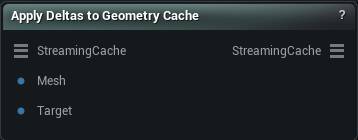
The Apply Deltas to Geometry Cache node
When to use it
One shape change, stamped onto every frame of a geometry cache, so a fix you sculpt once follows the whole take.
The output is a Streaming Cache pin, so it chains with Sculpt (deltas accumulate) and is persisted by feeding an Export node. Nothing is written to disk here.
How to use it
1
Connect a streaming cache
From Load Geometry Cache, Load Alembic File or Load USD File.
2
Connect the rest Mesh and the edited Target
The two must share vertex order.
Pins
Pin
Type
Description
StreamingCache
Streaming Geometry Cache
The cache to change. Every frame in it picks up the same edit.
Mesh
Mesh
The reference mesh before you sculpted it.
Target
Mesh
The same mesh after sculpting. Whatever moved between the two is what every frame gets, so the vertex counts have to match or the node errors and passes the cache straight through.
Pin
Type
Description
StreamingCache
Streaming Geometry Cache
Same cache, now with the edit folded into every frame. Chain another one of these on to stack a second fix.
Grabs one frame out of a streaming geometry cache as an ordinary mesh, so any static mesh node can work on a single moment of an animation. The archive opens once and stays open, so stepping frames...
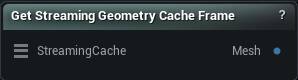
The Get Streaming Geometry Cache Frame node
When to use it
Grabs one frame out of a streaming geometry cache as an ordinary mesh, so any static mesh node can work on a single moment of an animation. The archive opens once and stays open, so stepping frames costs one read each.
Per-frame sculpt deltas set upstream by Geometry Cache Sculpt are folded in automatically, so what you get is the edited frame rather than the raw archive sample.
Pins
Pin
Type
Description
StreamingCache
Streaming Geometry Cache
The cache to read from. The file stays on disk and is only opened when a frame is asked for.
Pin
Type
Description
Mesh
Mesh
The mesh at the frame you picked.
Settings
Setting
Type
Description
Frame Number
Whole number
Which frame to read. Past Max Frame Number the node errors rather than quietly handing you a different frame.