Studio and Graph › Exporters
Write Alembic
A single-sample poly mesh in an .abc archive, with every UV set. Alembic is at its best as a modelling handoff to Maya, Houdini or ZBrush.
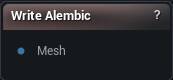
The Write Alembic node
When to use it
A single-sample poly mesh in an .abc archive, with every UV set. Alembic is at its best as a modelling handoff to Maya, Houdini or ZBrush.
This is the static-asset counterpart to Export Geometry Cache to Alembic: that node bakes a deforming sequence, this one writes one shape.
There is no skeleton in an Alembic file, so a rigged character has to go out as FBX.
How to use it
- 1
Connect a mesh to the Mesh input pin
- 2
Tweak the axis and scale settings
- 3
Click Write Alembic and choose a destination
Pins
| Pin | Type | Description |
|---|---|---|
Mesh |
Mesh | The mesh to save. Alembic keeps the shape, normals and UVs, but has nowhere to put vertex colours or materials. |
Settings
| Setting | Type | Description |
|---|---|---|
Scale |
Number | Multiplies every vertex position on the way out. Alembic records no units anywhere in the file, so these numbers are the whole story: the 0.01 default turns MeshMorpher's centimetres into the metres Houdini and Blender expect. Leave it at 1 and the mesh lands a hundred times too big in those - though Maya itself works in centimetres, so a Maya-only round trip may want 1. Set it to 1 for a file you intend to load back into MeshMorpher, which reads the numbers as they are. |
Y Up |
True/False | Stands the mesh up Y-up, the way most other packages want it, instead of the Z-up MeshMorpher works in. Either way the shape is preserved, not mirrored, and Load Alembic File brings it back exactly as it left. |
Flip Winding |
True/False | Reverses triangle winding, which is what keeps the surface facing outward once the axes have been converted. Leave it on: switch it off and the mesh opens inside out, and Alembic has nowhere to record that you meant it. |
Flip V |
True/False | Flips V so UVs sit the way Maya reads them. Get it wrong and textures come out upside down. |
Write All UV Sets |
True/False | Writes every UV set, not just the first. The extras come through named uv1, uv2 and so on. |
Mesh Name |
Text | What the mesh is called once it is inside the file. |
Available in Mesh Morpher Graph and Mesh Morpher Studio.