Studio and Graph › Deltas
Get Deltas
Subtracts a base mesh from a sculpted one and hands you the per-vertex offsets. Apply Deltas (Topo Match) is the other half of the pair: this lifts a shape change off one mesh, that replays it on a...
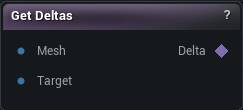
The Get Deltas node
When to use it
Subtracts a base mesh from a sculpted one and hands you the per-vertex offsets. Apply Deltas (Topo Match) is the other half of the pair: this lifts a shape change off one mesh, that replays it on another.
Wire the untouched mesh into Mesh and the sculpted one into Target. Both inputs need the same vertex count and the same vertex order.
If the result looks like noise rather than a shape, the two meshes went through different remesh or weld steps and no longer index the same vertices. Re-derive both from a common ancestor. Trying to correct the output is wasted time.
Pins
| Pin | Type | Description |
|---|---|---|
Mesh |
Mesh | The mesh before it was changed. |
Target |
Mesh | The same mesh after it was changed. Same vertex count, or the node stops with an error. |
| Pin | Type | Description |
|---|---|---|
Delta |
Deltas | How far each vertex moved, on its own. |
Available in Mesh Morpher Graph and Mesh Morpher Studio.