Studio and Graph › Deltas
Apply Deltas
You sculpted a change into one mesh and want that same change on a second mesh built from different geometry. Feed the second mesh into Mesh, the unsculpted reference into Target, and the sculpted ...
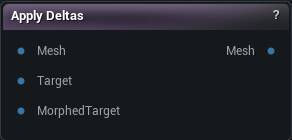
The Apply Deltas node
When to use it
You sculpted a change into one mesh and want that same change on a second mesh built from different geometry. Feed the second mesh into Mesh, the unsculpted reference into Target, and the sculpted one into Morphed Target.
Pins
| Pin | Type | Description |
|---|---|---|
Mesh |
Mesh | The mesh you want the change to land on. |
Target |
Mesh | The reference mesh before it was sculpted. |
MorphedTarget |
Mesh | The same reference mesh after sculpting. Whatever moved between these two is what gets copied. |
| Pin | Type | Description |
|---|---|---|
Mesh |
Mesh | The input mesh with the change applied. |
Settings
| Setting | Type | Description |
|---|---|---|
Vertex Threshold |
Number | How far the node will look for a matching point on the other mesh. Too low and patches of surface never move at all; too high and the change jumps a gap onto the wrong side of a fold, so lips pull into teeth. |
Normal Incompatibility Threshold |
Number | How far a surface can face away from a vertex and still count as a match. 0.5 allows anything up to 90 degrees apart; lower is stricter, and 0 skips the check. Lower it when the change keeps landing on the back of a thin part. |
Match Material IDs |
True/False | Only pair up parts of the two meshes that use the same material. Handy where separate pieces sit close together, like eyeballs inside lids. |
Subdivision |
Whole number | Splits Target and Morphed Target finer before the change is measured, which gives the transfer more points to hit. Each step roughly quadruples the triangle count, so 1 or 2 is usually as far as you want to go. |
Match By UV |
True/False | Experimental. Pairs Target and Morphed Target through their UVs instead of vertex order, so those two can have different vertex counts. Skip it on welded meshes - welding is what breaks the UVs this relies on. |
Smooth Iterations |
Whole number | How many smoothing passes run over the transferred change. Leave it at 0 for a straight transfer; raise it when the result comes out lumpy where the two meshes disagree. |
Smooth Strength |
Number | How far each smoothing pass moves things. A few gentle passes keep more of the shape than one strong one. |
Smooth Type |
Choice | Which kind of smoothing to use. Preserve UV Flow weights by triangle shape and holds detail best, Uniform treats every neighbour the same and evens out faster, Delta smooths the movement rather than the surface. |
Transfer Bone Transforms |
True/False | Also copy bone poses from Morphed Target onto the result, matched by bone name. Bones with no match keep the pose they already had. |
Available in Mesh Morpher Graph and Mesh Morpher Studio.