Classic
Runtime
25 pages in this section.
Mesh Morpher documentation
Classic
25 pages in this section.
Classic › Runtime
Standalone Morph Targets are a custom implementation of standard Morph Targets.
Standalone Morph Targets are a custom implementation of standard Morph Targets.
This new type of asset format allows users to store Morph Targets as standalone assets which can be visible in Content Browser.
The usage of Standalone Morph Targets is different from standard Morph Targets and the main purpose here is to allow transferring, baking and projection at runtime, easier, without interfering with the existing Morph Targets.
Standalone Morph Targets are exposed to blueprints and there are several nodes and tools that allow users to manipulate them at runtime.
Classic › Runtime › Standalone Morph Target
Retrieves a Delta at Index for the provided Standalone Morph Target and LOD.
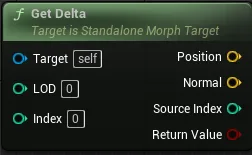
| Parameter | Description |
|---|---|
Target
|
Standalone Morph Target to retrieve the Delta from. |
LOD
|
LOD Index to retrieve the Delta from. If the LOD is not available in the Standalone Morph Target then the function will retrieve false. |
Index
|
Delta Index to retrieve |
| Parameter | Description |
|---|---|
Position
|
Delta Position |
Normal
|
Delta Normal |
Source Index
|
Vertex index associated with found Delta |
Return Value
|
Returns true if the Delta index was found. |
Classic › Runtime › Standalone Morph Target
Retrieve the amount of LODs used by the provided Standalone Morph Target.

| Parameter | Description |
|---|---|
Target
|
Standalone Morph Target to retrieve the LODs count from. |
| Parameter | Description |
|---|---|
Return Value
|
LODs count. |
Classic › Runtime › Standalone Morph Target
Retrieves the Delta count for the provided Standalone Morph Target and LOD.
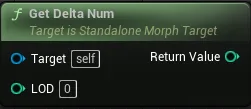
| Parameter | Description |
|---|---|
Target
|
Standalone Morph Target to retrieve the Delta from. |
LOD
|
LOD Index to retrieve the Delta from. If the LOD is not available in the Standalone Morph Target then the function will return -1. |
| Parameter | Description |
|---|---|
Return Value
|
Returns -1 if provided LOD is invalid. |
Classic › Runtime › Standalone Morph Target
Retrieves the assigned Skeletal Mesh for the provided Standalone Morph Target.

| Parameter | Description |
|---|---|
Target
|
Standalone Morph Target to retrieve the Skeletal Mesh from. |
| Parameter | Description |
|---|---|
Return Value
|
Skeletal Mesh Object |
Classic › Runtime › Standalone Morph Target
Retrieves the assigned Name for the provided Standalone Morph Target.
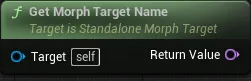
| Parameter | Description |
|---|---|
Target
|
Standalone Morph Target to retrieve the Name from. |
| Parameter | Description |
|---|---|
Return Value
|
Morph Target Name |
Classic › Runtime › Standalone Morph Target
Assigns a new Morph Target Name for the provided Standalone Morph Target.
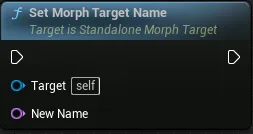
| Parameter | Description |
|---|---|
Target
|
Standalone Morph Target to assign the Name to. |
New Name
|
The new Morph Target Name |
Classic › Runtime › Standalone Morph Target
Retrieves the current Weight for the provided Standalone Morph Target.
Retrieves the current Weight for the provided Standalone Morph Target.
Weight represents the impact this Standalone Morph Target has on its Skeletal Mesh
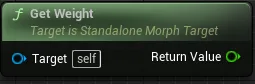
| Parameter | Description |
|---|---|
Target
|
Standalone Morph Target to retrieve the Name from. |
| Parameter | Description |
|---|---|
Return Value Float (single-precision) |
Current Weight |
Classic › Runtime › Standalone Morph Target
Bakes the Standalone Morph Target in Skeletal Mesh Render Data by the provided Weight.
Bakes the Standalone Morph Target in Skeletal Mesh Render Data by the provided Weight.
Weight represents the impact this Standalone Morph Target has on its Skeletal Mesh
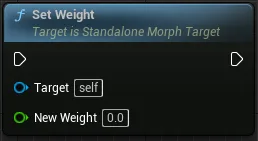
| Parameter | Description |
|---|---|
Target
|
Standalone Morph Target to retrieve the Name from. |
New Weight Float (single-precision) |
New Weight of the provided Standalone Morph Target |
Classic › Runtime › Standalone Morph Target
Duplicate a Standalone Morph Target and assign a new Target Skeletal Mesh
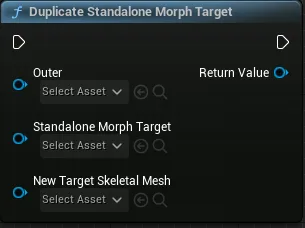
| Parameter | Description |
|---|---|
Outer
|
Outer used for the duplicate Standalone Morph Target |
StandaloneMorphTarget
|
Standalone Morph Target to duplicate |
NewTargetSkeletalMesh
|
New Target Skeletal Mesh to assign to the duplicate. If left empty, the Target Skeletal Mesh will be the same as the input Standalone Morph Target |
| Parameter | Description |
|---|---|
Return Value
|
Returns nullptr if duplicating fails. |
Classic › Runtime
Classic › Runtime › Project
Projects an array of Standalone Morph Targets on a Target Mesh and creates Morph Targets on the Target Skeletal Mesh.
Projects an array of Standalone Morph Targets on a Target Mesh and creates Morph Targets on the Target Skeletal Mesh.
Morph Targets are projected on all Target Mesh LODs.
Projection is multi-threaded but can be very intensive on meshes with big data.
Unreal Engine 5.0.X requires Use GPU for computing morph targets disabled in project settings. This doesn't apply for UE 5.1 and above.

Creating Morph Targets at runtime will invalidate existing Morph Targets available in editor.
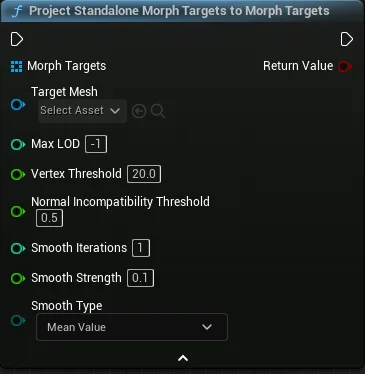
You can learn more about Standalone Morph Targets here.
| Parameter | Description |
|---|---|
Morph Targets
|
Standalone Morph Targets to project. |
Target Mesh
|
Target Mesh to project Standalone Morph Targets on. |
Max LOD
|
Maximum LOD Index on the Target Mesh to project the Morph Targets |
Vertex Threshold
|
Maximum Distance threshold between a vertex in the target mesh and a vertex in source mesh, at which they are considered to be correspondent. |
Normal Incompatibility Threshold
|
Normal threshold at which a triangle is deemed as incompatible. This helps to avoid triangle flipping during Projection. |
Smooth Iterations
|
Smooth Iterations steps used to Smooth the resulted Projected Deltas. |
Smooth Strength
|
Smooth Strength used to Smooth the resulted Projected Deltas. |
Smooth Type
|
Smooth Type used to Smooth the resulted Projected Deltas. |
| Parameter | Description |
|---|---|
Return Value
|
Returns true if at least one Morph Target was successfully created. |
Classic › Runtime › Project
Projects an array of Standalone Morph Targets on a Target Mesh and creates Standalone Morph Targets.
Projects an array of Standalone Morph Targets on a Target Mesh and creates Standalone Morph Targets.
Morph Targets are projected on all Target Mesh LODs.
Projection is multi-threaded but can be very intensive on meshes with big data.
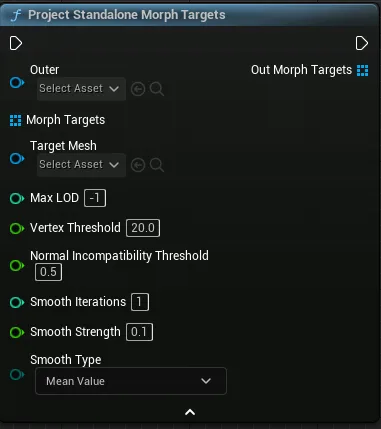
You can learn more about Standalone Morph Targets here.
| Parameter | Description |
|---|---|
Outer
|
Outer used for the resulted Standalone Morph Targets created during Projection. |
Morph Targets
|
Standalone Morph Targets to project. |
Target Mesh
|
Target Mesh to project Standalone Morph Targets on. |
Max LOD
|
Maximum LOD Index on the Target Mesh to project the Morph Targets |
Vertex Threshold
|
Maximum Distance threshold between a vertex in the target mesh and a vertex in source mesh, at which they are considered to be correspondent. |
Normal Incompatibility Threshold
|
Normal threshold at which a triangle is deemed as incompatible. This helps to avoid triangle flipping during Projection. |
Smooth Iterations
|
Smooth Iterations steps used to Smooth the resulted Projected Deltas. |
Smooth Strength
|
Smooth Strength used to Smooth the resulted Projected Deltas. |
Smooth Type
|
Smooth Type used to Smooth the resulted Projected Deltas. |
| Parameter | Description |
|---|---|
Out Morph Targets
|
Resulted Standalone Morph Targets. |
Classic › Runtime
Classic › Runtime › Create from Mesh Files
Grabs the deltas between Base and Morph files and projects them on the Target Mesh and creates a Morph Target on the Target Skeletal Mesh.
Grabs the deltas between Base and Morph files and projects them on the Target Mesh and creates a Morph Target on the Target Skeletal Mesh.
This node requires Base and Morphed files to be FBX/OBJ format.
Base and Morphed files are required to have same vertex count and order.
Morph Targets are projected on all Target Mesh LODs.
Projection is multi-threaded but can be very intensive on meshes with big data.
Unreal Engine 5.0.X requires Use GPU for computing morph targets disabled in project settings. This doesn't apply for UE 5.1 and above.
Creating Morph Targets at runtime will invalidate existing Morph Targets available in editor.
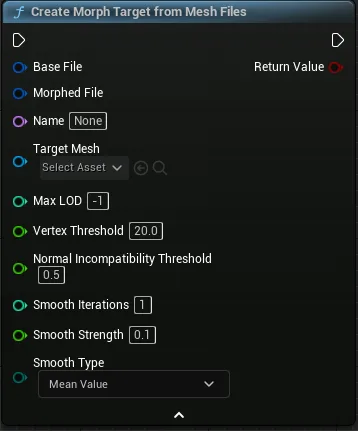
| Parameter | Description |
|---|---|
Base File
|
FBX File and Import Settings of the Base FBX. |
Morphed File
|
FBX File and Import Settings of the Morph FBX. |
Name
|
Morph Target Name. |
Target Mesh
|
Target Mesh to project Standalone Morph Targets on. |
Max LOD
|
Maximum LOD Index on the Target Mesh to project the Morph Targets |
Vertex Threshold
|
Maximum Distance threshold between a vertex in the target mesh and a vertex in source mesh, at which they are considered to be correspondent. |
Normal Incompatibility Threshold
|
Normal threshold at which a triangle is deemed as incompatible. This helps to avoid triangle flipping during Projection. |
Smooth Iterations
|
Smooth Iterations steps used to Smooth the resulted Projected Deltas. |
Smooth Strength
|
Smooth Strength used to Smooth the resulted Projected Deltas. |
Smooth Type
|
Smooth Type used to Smooth the resulted Projected Deltas. |
| Parameter | Description |
|---|---|
Return Value
|
Returns true if the Morph Target was successfully created. |
Classic › Runtime › Create from Mesh Files
Grabs the deltas between Base and Morph files and projects them on the Target Mesh and creates a Standalone Morph Target.
Grabs the deltas between Base and Morph files and projects them on the Target Mesh and creates a Standalone Morph Target.
This node requires Base and Morphed files to be FBX/OBJ format.
Base and Morphed files are required to have same vertex count and order.
Morph Targets are projected on all Target Mesh LODs.
Projection is multi-threaded but can be very intensive on meshes with big data.
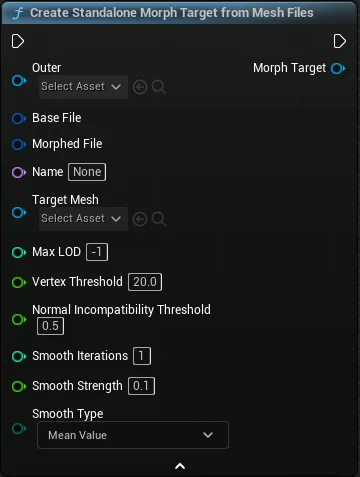
You can learn more about Standalone Morph Targets here.
| Parameter | Description |
|---|---|
Outer
|
Outer used for the resulted Standalone Morph Targets created during Projection. |
Base File
|
FBX File and Import Settings of the Base FBX. |
Morphed File
|
FBX File and Import Settings of the Morph FBX. |
Name
|
Assigned Morph Target Name. |
Target Mesh
|
Target Mesh to project Standalone Morph Targets on. |
Max LOD
|
Maximum LOD Index on the Target Mesh to project the Morph Targets |
Vertex Threshold
|
Maximum Distance threshold between a vertex in the target mesh and a vertex in source mesh, at which they are considered to be correspondent. |
Normal Incompatibility Threshold
|
Normal threshold at which a triangle is deemed as incompatible. This helps to avoid triangle flipping during Projection. |
Smooth Iterations
|
Smooth Iterations steps used to Smooth the resulted Projected Deltas. |
Smooth Strength
|
Smooth Strength used to Smooth the resulted Projected Deltas. |
Smooth Type
|
Smooth Type used to Smooth the resulted Projected Deltas. |
| Parameter | Description |
|---|---|
Morph Target
|
Resulted Standalone Morph Target. |
Classic › Runtime
Classic › Runtime › Utilities
Exports a Skeletal Mesh Render Data to an OBJ File.
Exports a Skeletal Mesh Render Data to an OBJ File.
Export is done using X as Forward Axis and Y as Up Axis.
This node exports the Skeletal Mesh Render Data and it will reflect any baked Standalone Morph Targets.
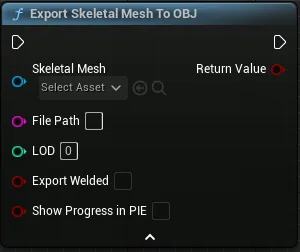
| Parameter | Description |
|---|---|
Skeletal Mesh
|
Skeletal Mesh to Export. |
File Path
|
Destination File Path. |
LOD
|
The LOD to export. This is automatically clamped to match the skeletal mesh. |
Export Welded
|
Whether to export a welded mesh. |
Show Progress in PIE
|
Whether to display the progress bar in PIE. |
| Parameter | Description |
|---|---|
Return Value
|
Returns true if exported successfully. |
Classic › Runtime › Utilities
Retrieve all Morph Targets Names from a Skeletal Mesh.
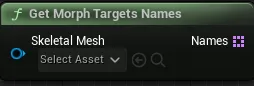
| Parameter | Description |
|---|---|
Skeletal Mesh
|
Skeletal Mesh to retrieve Morph Targets names from. |
| Parameter | Description |
|---|---|
Names
|
The array of Morph Target Names retrieved from the Skeletal Mesh |
Classic › Runtime › Utilities
Attempts to find a Morph Target with the given Name
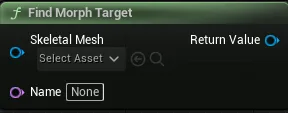
| Parameter | Description |
|---|---|
Skeletal Mesh
|
Skeletal Mesh to search on. |
Name
|
The Name to search for |
| Parameter | Description |
|---|---|
Return Value |
Returns a valid Morph Target Object if the search was successful. |
Classic › Runtime › Utilities
Removes a Morph Target with the given name from the Skeletal Mesh.
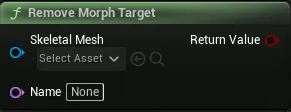
| Parameter | Description |
|---|---|
Skeletal Mesh
|
Skeletal Mesh to remove from. |
Name
|
The Name of the Morph Target to be removed |
| Parameter | Description |
|---|---|
Return Value |
Returns true if the Morph Target was successfully removed. |
Classic › Runtime › Utilities
Duplicate a Skeletal Mesh. It duplicates, cloth, physics and LOD data. Morph Targets are not transferred to the duplicate.
This functionality is available only for UE 5.2 and above
Useful to instance skeletal mesh before applying Standalone Morph Targets.
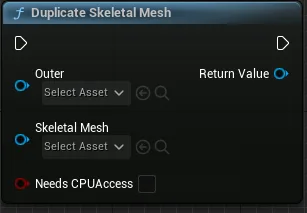
| Parameter | Description |
|---|---|
Outer
|
Outer used for the duplicate Skeletal Mesh |
SkeletalMesh
|
Skeletal Mesh to duplicate |
bNeedsCPUAccess
|
Whether to enable CPU Access for the duplicate mesh |
| Parameter | Description |
|---|---|
Return Value
|
Returns nullptr if duplicating fails. |
Classic › Runtime › Utilities
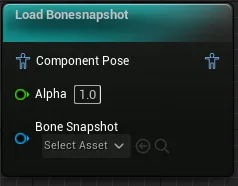
Load a Bonesnapshot through Animation Blueprints. 
Classic › Runtime › Utilities
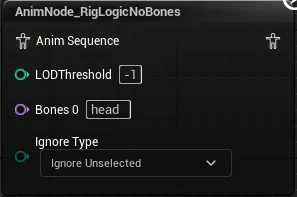
This Animation Blueprint node allows users to select which bones are updated by Meta Human Rig Logic functionality.
| Ignore Type | Description |
|---|---|
| Ignore Selected | Bones that are listed will not be updated by rig logic |
| Ignore Unselected | Bones that are listed will be updated by rig logic |
Right clicking the nodes brings up its own menu: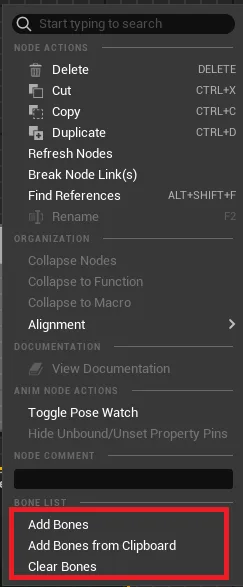
Add Bones adds one item to Bones array
Add Bones from Clipboard pastes bones array from clipboard into the Bones array
Clear Bones clears the entire Bones array. Requires selecting Refresh Nodes afterwards so all node Pins get also removed.
root
pelvis
spine_01
spine_02
spine_03
spine_04
spine_05
clavicle_pec_l
clavicle_pec_r
spine_04_latissimus_l
spine_04_latissimus_r
clavicle_l
clavicle_out_l
clavicle_scap_l
upperarm_l
upperarm_correctiveRoot_l
upperarm_out_l
upperarm_fwd_l
upperarm_in_l
upperarm_bck_l
clavicle_r
clavicle_out_r
clavicle_scap_r
upperarm_r
upperarm_correctiveRoot_r
upperarm_out_r
upperarm_fwd_r
upperarm_in_r
upperarm_bck_r
neck_01
neck_02
head
FACIAL_C_FacialRoot
Classic › Runtime