Classic › Editor
Classic › Editor › UI
New
Classic › Editor › UI
Exit
Classic › Editor › UI
Camera FOV
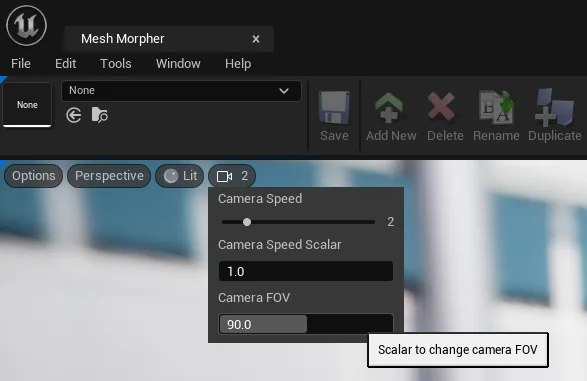
Mesh Morpher allows users to change the camera FOV in the preview viewport.
Navigate to the camera menu in the viewport and set the slider to the desired value.
Classic › Editor › UI
Focus Camera
Mesh Morpher allows users to focus the camera while pointing at the Skeletal Mesh to focus the camera on that specific point.
Navigate to Edit top dropdown menu and click Focus Camera.
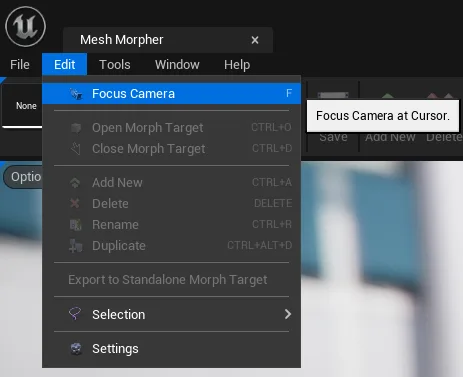
Keyboard shortcut: F

Use Mouse Wheel to adjust the Focusing distance.
Classic › Editor › UI
Ruler
Ruler allows us to measure and Track MetaHuman Deformations with Ruler. We can track how Morph Targets, Animations, Animations Curves affect our selected Points of Interest so we can better underst...
Ruler allows us to measure and Track MetaHuman Deformations with Ruler. We can track how Morph Targets, Animations, Animations Curves affect our selected Points of Interest so we can better understand what we can do to fine-tune our skeletal meshes.
Left Click to add points. Right Click on points to remove them.