Classic › Editor › Tools › General
Brush
Mesh Morpher allows users to configure the Brush parameters to help them achieve wanted results with the Tools.
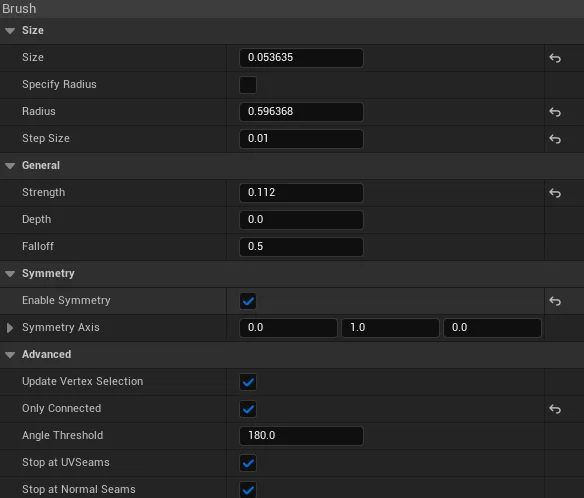
| Options | Description |
|---|---|
| Size | Size of the brush indicator relative to the mesh size |
| Specify Radius | Users can also manually specify a brush radius by enabling this option |
| Radius | Radius of the brush |
| Step Size | By pressing [ and ] users can increase/decrease the brush size by the Step Size amount |
| Strength | Strength of the brush. Changes how impactful the brush actions are |
| Depth | Depth allow to change how deep the Brush gets placed on the Drag Plane, the initial brush positioning. |
| Falloff | Allows to change how impactful the brush can be on the outskirts. |
| Falloff Type | Falloff type applied on the outskirts of the brush. |
| Enable Symmetry | If enabled, a second brush indicator will appear that will be placed at 180 rotation to the Symmetry Axis. 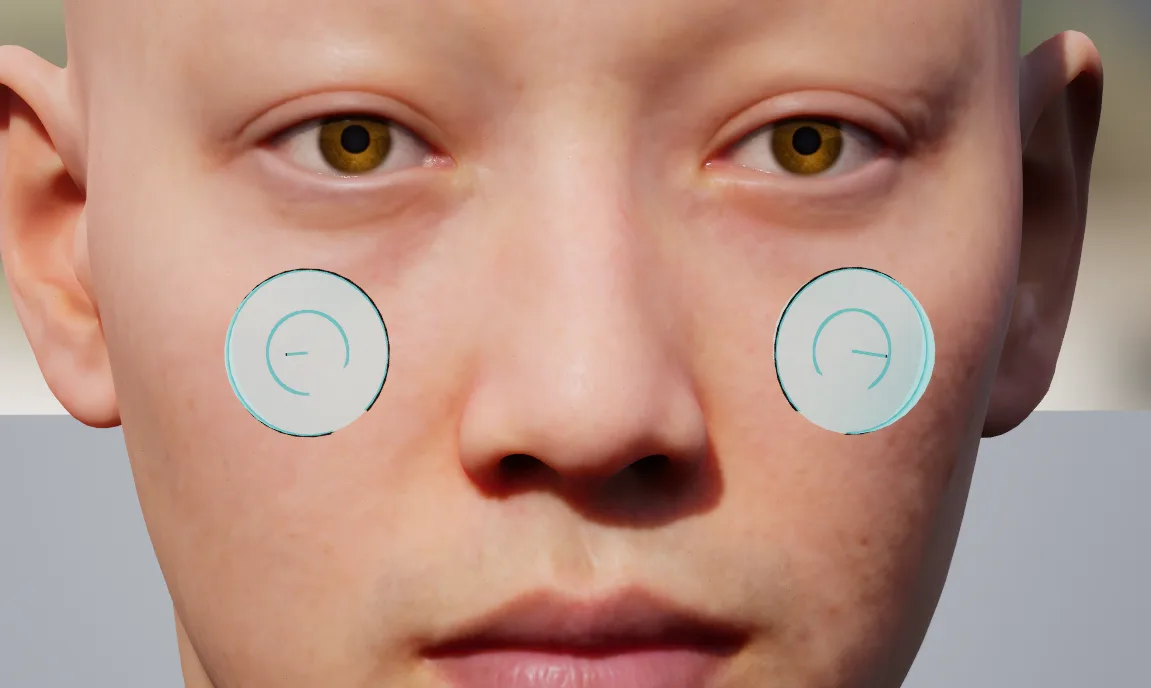 |
| Symmetry Axis | Mesh Morpher uses Y forward so the symmetric brush will be placed accordingly |
| Update Vertex Selection | Whether to update the vertex selection on brush move |
| Only Facing Camera | Whether to only hit and select vertices only facing camera. |
| Only Connected | Enabling this options disables Only Facing Camera option. This options allows users to select and use the brushes only on connected triangles. |
| Angle Threshold | The angle threshold at which the triangles are still marked as connected |
| Stop at UV Seams | Stops the iteration of connected triangles at UV seams |
| Stop at Normal Seams | Stops the iteration of connected triangles at Normal seams |